
 Share
Share
 Print
Print
|
|
|
|
|


Project Team

The System Transaction Codes are displayed with both the Code Names and Descriptions. The Code Descriptions directly illustrate their functionality and role in the system, as fields are populated and tasks are performed.
Transaction Code: |
Project Lead checkbox |
General Description: |
Allows the Project Lead checkbox to Be Enabled for a Single Project Team Tran Code |
Are Authorization Steps Available? |
N |
Is System Notification Available? |
N |
Trax Control Panel Path(s): |
Production/ Update/ W/O/ Task Card |
Windows(s): |
w_wo_task_card |
Related Switch(s): |
Not Applicable |
Functions: |
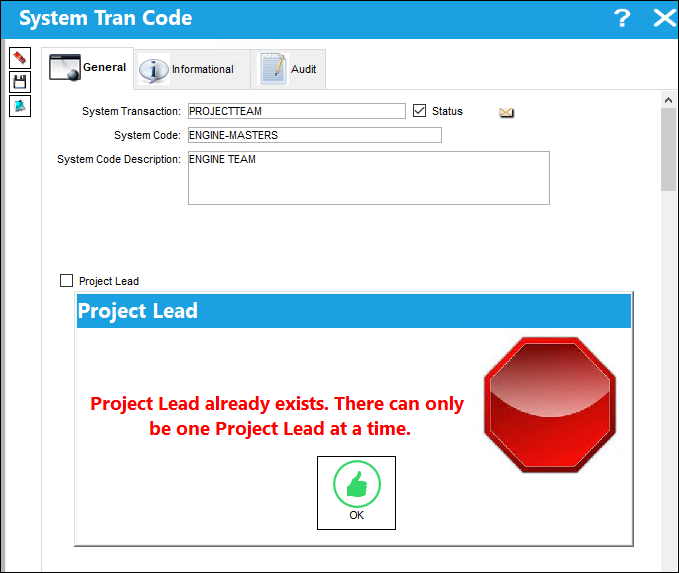
A Project Lead can be enabled and and saved for a single Project Team Tran code using the Project Lead checkbox. The system also imposes a hard warning preventing the Project Lead button to be enabled on any additional Transaction Codes. This ensures only on Project Lead can exist at any given time. |
Reports: |
NA |
Available Functionality:
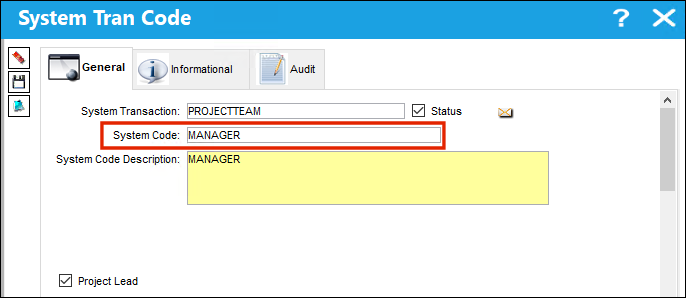
Locate and select a a Project Team Transaction Code. Select the Project Lead checkbox to assign a Project Lead.
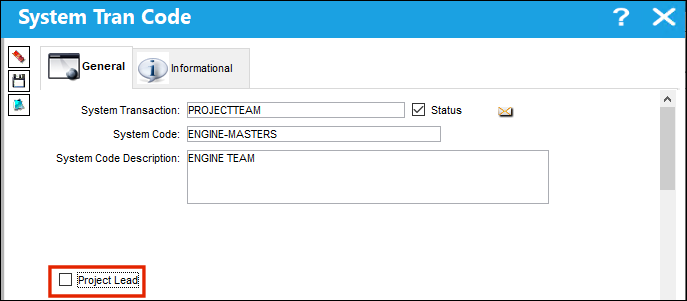
An additional Project Team Transaction Code is selected. The user attempts to select the Project Lead checkbox.
A hard warning appears preventing the user from selecting an additional Project Lead without first deselecting the Project Lead from another Transaction Code. This prevents two Project leads from being assigned at once.
Share
Print
|
©1997-2026 Trax USA Corp. All rights reserved. This manual may not be copied, photocopied, reproduced, translated, or converted to any electronic or machine-readable form, in whole or in part, without prior written approval from Trax USA Corp. |
 |