
 Share
Share
 Print
Print
|
|
|
|
|


Click on the Tear Down Report  button to edit or create a Tear Down report. This button is only available when receiving a repair order via order receiving. This option could be useful for the purposes of refining the repair order receiving process. By having the receiving clerk enter Tear Down report information from this window, this minimizes the need for the inspector to do data entry via receiving inspection.
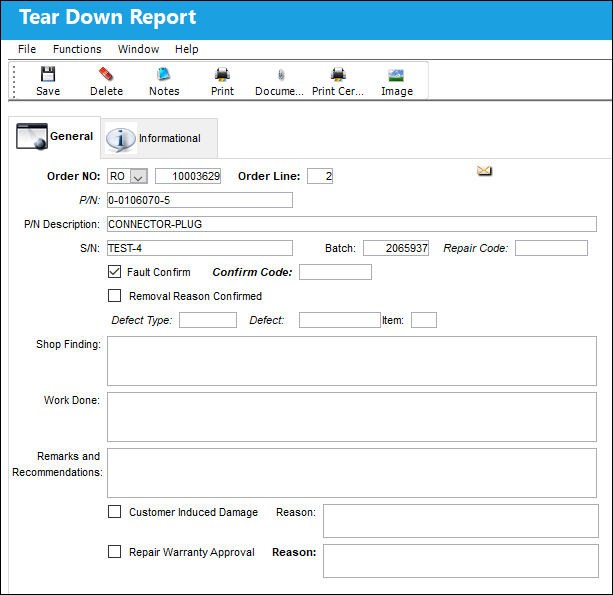
The following information/options are available in this window:
_____________________________________________________________________________________
Order Type
Type of Order. By order type, certain receiving and financial behaviors will be assigned to the order at receiving of the various Order Types. These order types exist under the Orders or Customer Orders Modules exclusively. All Order Types are Hard Coded into the programming syntax.
Order No
The type of order and the order number for the transaction.
Order Line
The line number on the Order associated with the returned part.
P/N
The Part Number reference for the aircraft part.
P/N Description
The description of the part.
S/N
The Serial Number for the specific serialized part.
Batch
The inventory number that is currently associated with a part or group of parts. A part's Batch number can change after various types of transactions take place.
Repair Code
The repair code associated to the part number.
Confirm Code
The confirmation reference along with applicable information.
Defect Type
The type of defect found on the aircraft (for example, Pilot Report, MX Report).
Defect
The defect number (or log book number).
Item
The specific item number on the Task Card that this record is to be associated with. Leave default '0' to have this record associated with all item numbers on the Task Card.
Shop Finding
The results of the shop inspection.
Work Done
The Item work that was performed by the mechanic.
Remarks and Recommendations
Allows lead mechanics or supervisors to provide recommendations to the mechanic(s) who worked on the Tear Down.
Reason
Free text reason.
_____________________________________________________________________________________
The following tab and buttons offer additional functionality:
- Tear Down Report, Informational Tab
- Notes Button
- Print Button
- Document Control Button
- Print Certificate of Calibration Button
- Image Button
Share
Print
|
©1997-2026 Trax USA Corp. All rights reserved. This manual may not be copied, photocopied, reproduced, translated, or converted to any electronic or machine-readable form, in whole or in part, without prior written approval from Trax USA Corp. |
 |