
 Share
Share
 Print
Print
|
|
|
|
|


The Audit Tab shows any changes made and the user who made them.
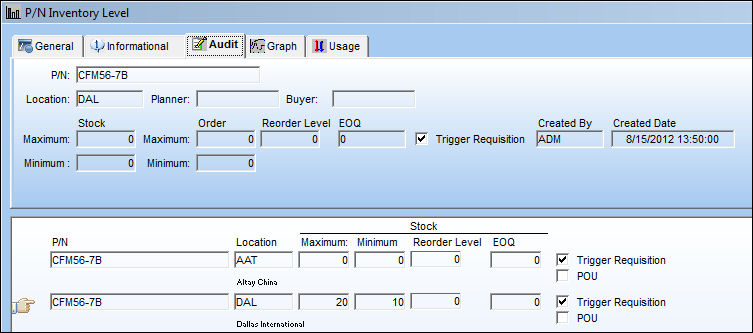
This tab has been replaced by the Audit  button in TRAX Version 11 and forward.
The following information/options are available in this window:
_____________________________________________________________________________________
P/N
The Part Number reference for the aircraft part. This is the Part Number to set levels for.
Location
The Location for maintenance events, inventory stores, orders, transactions, or training events.
Planner
The person responsible for material planning for this part.
Buyer
The person responsible for buying this part. The Buyer will also automatically appear in association with the part when the part is placed on a Requisition (via Requisition/Update/ Requisition/Requisition Detail/Optional Tab/Assign To field).
Stock Maximum
The maximum in stock quantity allowed. The maximum stock level is used by businesses to control the number of goods in a warehouse, which takes into account demand while preventing overstock. This number should be the upper limit for a location to have available before storage costs or loss of value negatively affect expenses.
Stock Minimum
The minimum in stock quantity required (Safety Stock). The minimum stock level can be used to report on items that require urgent action.
Order Maximum
The maximum quantity allowed on a Purchase Order. This information may appear on certain Prints.
Order Minimum
The minimum in stock quantity required (Safety Stock). The minimum stock level can be used to report on items that require urgent action.
Reorder Level
The Re-Order point for the Part. The Re-Order point is established so that the system can automatically create Requisitions for parts that have reached a certain stock quantity level. (Requisitions are triggered based on whole numbers only.) Purchasing actions can then be considered. Please refer to the Inventory manual (section “P/N Re-Order Level”) for additional related information. The Re-Order Level  button is used to reset the Re-Order Level based on past usage (the system automatically calculates this figure). This field triggers a Re-Order Level Requisition. Once the available parts in inventory are less than the (whole number) value specified in the Re-Order Level field, a requisition will automatically be created. If the Reorder Level quantity is less than the Order Minimum Quantity, then the Requisition that is triggered will be for the Order Minimum quantity instead of the Reorder Level quantity. For more information refer to the Order Minimum field.
EOQ
The “Economic Order Quantity” field is used to store a value that is calculated outside of the system. The value is usually calculated by materials managers and used to determine the quantity that is the optimum (lowest) total variable cost (unit costs that depend on volume) required to Order and hold inventory.
Created By
The user who created the record.
Created Date
The date the record was created.
_____________________________________________________________________________________
Share
Print
|
©1997-2026 Trax USA Corp. All rights reserved. This manual may not be copied, photocopied, reproduced, translated, or converted to any electronic or machine-readable form, in whole or in part, without prior written approval from Trax USA Corp. |
 |