
 Share
Share
 Print
Print
|
|
|
|
|


From the Warranty tab of the Vendor P/N Information window, the following is displayed.
To set up new vendor warranty information for the part number, enter the values in the following fields:
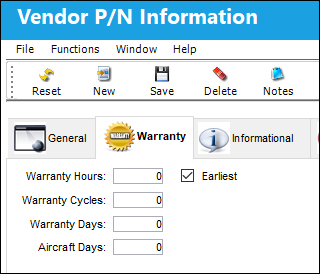
The following information/options are available in this window:
_____________________________________________________________________________________
Warranty Hours/Cycles/Days
The number of installed hours/cycles or calendar days the A/C component is under warranty.
Aircraft Days
The number of installed days the component is under warranty.
Earliest checkbox
When selected, the warranty for a component will expire once one of the following (hours/cycles/days/A/C days) reaches the warranty limit first. When the checkbox is de-selected, the warranty will only expire once ALL warranty limits are met.
_____________________________________________________________________________________
Share
Print
|
©1997-2026 Trax USA Corp. All rights reserved. This manual may not be copied, photocopied, reproduced, translated, or converted to any electronic or machine-readable form, in whole or in part, without prior written approval from Trax USA Corp. |
 |