
 Share
Share
 Print
Print
|
|
|
|
|


Authorizing the Manual
The Manuals awaiting authorization will appear in this list.
Select on the Manual to be authorized. Select the Step to be authorized. Right-click and choose Revision Step.
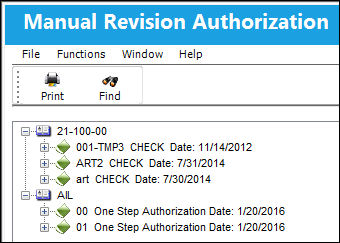
Selecting a Revision Step allows you to accept or reject the next Step for an item. Depending on the status of the item selected, the Step carried out could be a revision update or a revision dispatch, or both.
A dispatch print can be produced if required. A message can be automatically sent to the users who are required to look at the next Step.
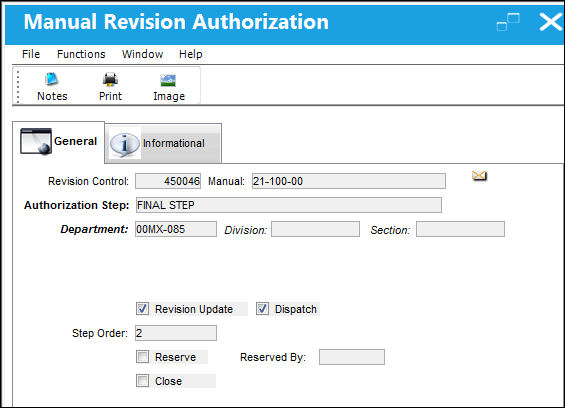
The following information/options are available in this window:
_____________________________________________________________________________________
Reserve checkbox
Check this box to reserve this Step to the performing user. This will allow only that user to access/modify this Step. This essentially places the Step on ‘hold’. Later, the user may un-check the box to remove it off ‘hold’ status.
_____________________________________________________________________________________
You can choose from the Accepted and Rejected radio buttons (which will default to Open). If any one step in the sequence of steps is rejected, the system will re-start the entire Authorization Process.
Click on the Save  button.
Perform any additional authorization Steps in the manner described.
After the final authorization Step is performed, the Assignment Sheet will be automatically produced for each copy (excluding the Master) that is held in the system for this Manual. The Assignment Sheets are to be sent with the revision/distribution copy and then will be returned to the appropriate department with the acknowledgment (confirmation signature).
Share
Print
|
©1997-2026 Trax USA Corp. All rights reserved. This manual may not be copied, photocopied, reproduced, translated, or converted to any electronic or machine-readable form, in whole or in part, without prior written approval from Trax USA Corp. |
 |