
 Share
Share
 Print
Print
|
|
|
|
|


Technical Publications Request, General Tab
TRAX displays the Technical Publications Request, General Tab.
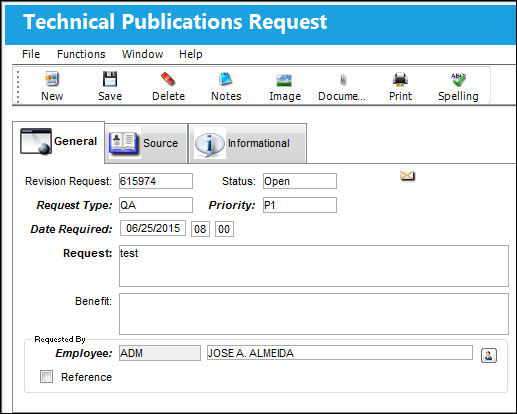
The following information/options are available in this window:
_____________________________________________________________________________________
Revision Request
The revision request number is automatically assigned by the system.
Status
The status of the Tech Pub Request (Open, Authorized, Closed, or Cancel). A new TechPub request will default to Open Status.
Request Type
Select a Request Type from the Drop Down Selection window.
The Request Type is a user defined System Transaction Code that is set up in Settings/Explorer/System Transaction Code/Library/Tech Pub Request Type.
Priority
Select a Priority Type from the Drop Down Selection window.
The Priority Type is a user defined System Transaction Code that is set up in Settings/Explorer/System Transaction Code/Library/Tech Pub Request Priority Type.
Date Required
Enter the date required and the time. Right click to select a date and enter a time manually.
Request
Enter a description of the change request which is a mandatory field.
Benefit
Enter a description of the benefit of the change requested (optional field).
Requested By
Enter an Employee (TRAX User) an external Reference who is requesting the change.
Employee
A TRAX User, this field is auto-populated by default with the current logged-in TRAX User, but can be manually changed.
Reference
Select this checkbox if the person making the request is not a TRAX User. Enter the name and Contact Phone number.
_____________________________________________________________________________________
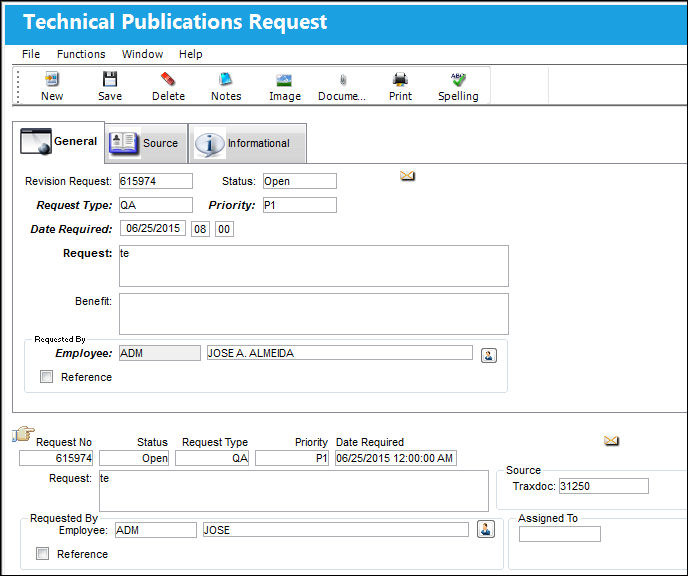
The Tech Pub Request is saved as shown below:
Share
Print
|
©1997-2026 Trax USA Corp. All rights reserved. This manual may not be copied, photocopied, reproduced, translated, or converted to any electronic or machine-readable form, in whole or in part, without prior written approval from Trax USA Corp. |
 |