
 Share
Share
 Print
Print
|
|
|
|
|


Defect Report, General Tab
The Defect Report, General Tab is used to query for Defect Reports based on the following search criteria. Enter any of the below search criteria to query for a desired Defect Report and select the Find  button.
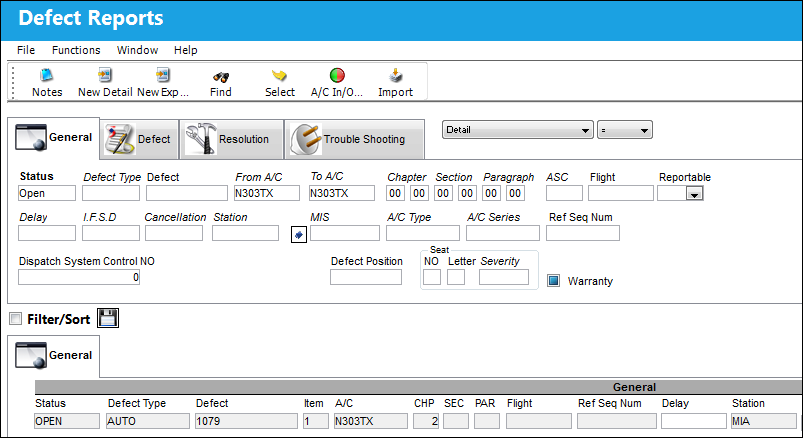
The following information/options are available in this window:
_____________________________________________________________________________________
Status
The current Status of the log.
All - Select the 'All' status to query for all logs.
Open - Select the 'Open' status to query for all logs in 'Open' status.
Closed - Select the 'Closed' status to query for all logs in 'Closed' status.
Defect Type
The type of defect found on the aircraft (for example, Pilot Report, MX Report). For additional information, refer to the Defect Type Transaction Code, via the Technical Records Transaction Code Manual.
Defect
The defect number (or log book number).
From A/C - To A/C
Enter the aircraft or aircraft range.
Chapter/Section/Paragraph
The ATA chapter/section/paragraph, as applicable.
ASC
The Aircraft System Code.
Flight
The flight reference number/information.
Reportable drop down
Select Yes, No, or All to filter for reportable defects. For additional information, refer to Delay Type System Transaction code via Technical Records Transaction Code manual.
Delay
The Delay Code (i.e. Equipment Failure, Scheduled Ground Time). For additional information, refer to the Delay Transaction Code, via the Technical Records Transaction Code Manual.
I.F.S.D.
The Engine In-Flight Shut Down code (i.e. Foreign Object Debris, Lightning Strike). These codes can be set up via the Technical Records Transaction Codes. Go to Settings/ Explorer/ System Transaction Code/ Technical Records.
Cancellation
The flight cancellation code if applicable (i.e. Maintenance Repairs, Ground Servicing). These codes can be set up via the Technical Records Transaction Codes. Go to Settings/ Explorer/ System Transaction Code/ Technical Records.
Station
The station where the defect was worked on.
MIS
The Mechanical Interruption Summary related to this Defect.
A/C Type / Series
The Aircraft Type and Series/Fleet assignment.
Ref Seq Num
The reference sequence number of this Defect.
Dispatch System Control NO.
This number is generated by the system and represents that the defect has been sent to SABRE for those customers with interfaces.
Unlock Defect  button
Selecting the Unlock Defect button allows the user to access and update the Defect Report in the event that the Defect Report record has been locked in error.
The appearance of the button will not change after it is selected to indicate that it has been unlocked.
Seat Number 
The passenger seat number on the aircraft.
Seat Letter
The passenger seat letter on the aircraft.
Seat Severity
The Seat Severity Code used to indicate the level of severity (i.e damage) of the seat. This can be selected from the list of Seat Severity Transaction Codes via the Technical Records System Transaction Codes.
Warranty Flag 
Select this checkbox if the aircraft is associated with a warranty condition
_____________________________________________________________________________________
Share
Print
|
©1997-2026 Trax USA Corp. All rights reserved. This manual may not be copied, photocopied, reproduced, translated, or converted to any electronic or machine-readable form, in whole or in part, without prior written approval from Trax USA Corp. |
 |