
 Share
Share
 Print
Print
|
|
|
|
|


Read and Sign, General Tab
Create/edit a new Read & Sign as follows.
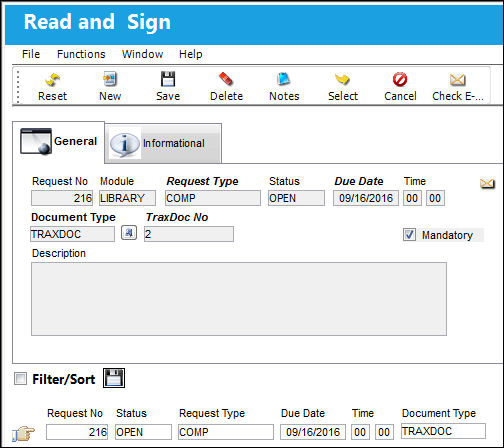
The following information/options are available in this window:
_____________________________________________________________________________________
Request No.
The request number is automatically assigned by the system.
Module
Defaults to ‘Library.'
Request Type
Select a request type.
The Request Type can be set up via Settings/Explorer/System Transaction Code/Library/Read & Sign Request Type.
Due Date
Enter a due date and time.
Status
Defaults to ‘Open.'
Document Type
Select a document type; TraxDoc, Manual, Document, or Other.
Description
Enter a description for the request. The description can describe what to look for in a document or a summary of revisions to a document.
Mandatory Checkbox
Click this checkbox if the request is mandatory.
_____________________________________________________________________________________
Share
Print
|
©1997-2026 Trax USA Corp. All rights reserved. This manual may not be copied, photocopied, reproduced, translated, or converted to any electronic or machine-readable form, in whole or in part, without prior written approval from Trax USA Corp. |
 |