
 Share
Share
 Print
Print
|
|
|
|
|


Add TRAX Users to the Read & Sign as follow:
From the Read & Sign Detail window, select the New  button. Select the 'User' Requester Type radio button. Populate all mandatory and desired fields and select the Save
  button.
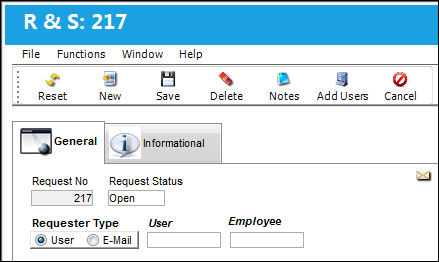
The following information/options are available in this window:
_____________________________________________________________________________________
Request No
The request number is automatically assigned by the system.
Request Status
The status of the Read & Sign. For additional information, refer to the Read & Sign Detail, General Tab, via Read and Sign of the Library Training Manual.
Requester Type
Once a Read & Sign is created, the user must add requests to the Read & Sign.
User Requester Type - A User Request Type is for a TRAX User who will receive a Read and Sign Requirement Notice in the TRAX System. The recipient will acknowledge and close that notice in TRAX.
User
Enter a User Name.
Employee
Select an employee within the User Name.
If the Employee Field is left blank all employees under that User Name will be added to the request. Upon saving, a message appears asking if you want to load all employees under the user name.
_____________________________________________________________________________________
Share
Print
|
©1997-2026 Trax USA Corp. All rights reserved. This manual may not be copied, photocopied, reproduced, translated, or converted to any electronic or machine-readable form, in whole or in part, without prior written approval from Trax USA Corp. |
 |