
 Share
Share
 Print
Print
|
|
|
|
|


The Add Users  button is to add multiple User Requests at a time. It allows the user to select the users from lists filtered by department or security profile.
Add TRAX User Requests to the Read & Sign as follows:
Click the Add Users button to open the Read & Sign Add User Window.
TRAX displays the Read & Sign Add User window. The below fields act like a query. Select any one or more of the below fields and select the Find  button. In the following example, the user has chosen to query by 'Skill'.
If none of the below fields are populated and the user selected the Find button, all users in the system will appear.

The results are shown below:
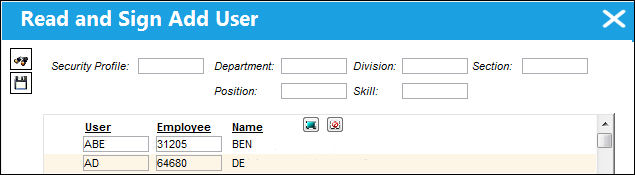
Select the Select All  button or the Deselect All
  button to select/de-select specified users and select the Save
  button.
Share
Print
|
©1997-2026 Trax USA Corp. All rights reserved. This manual may not be copied, photocopied, reproduced, translated, or converted to any electronic or machine-readable form, in whole or in part, without prior written approval from Trax USA Corp. |
 |