
 Share
Share
 Print
Print
|
|
|
|
|


The user may select the Invoice Merge  button to merge one invoice to another one.
Both invoices must exist for the same Customer Number.
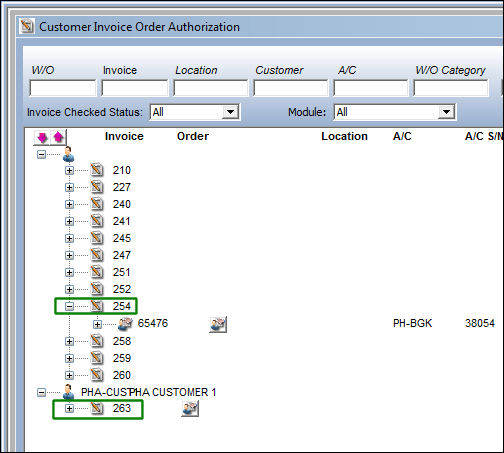
In the following example, the user will merge invoice 254 to invoice 263. Select the Invoice Merge button.
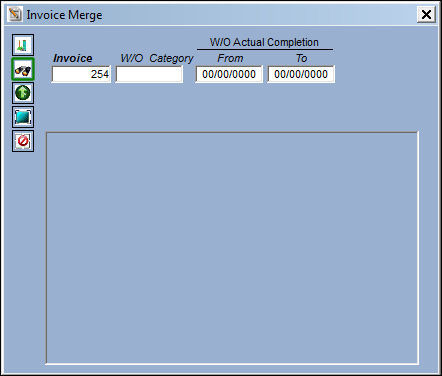
In the Invoice Merge window, select from any of the below fields to query for the invoice to be merged.
In this example, the user has elected to query by the Invoice. Select the Find  button to query.
All invoices for the Customer Number appear. Select the invoice to be merged onto invoice 254 by selecting the Merge checkbox. Select the Invoice Merge button.
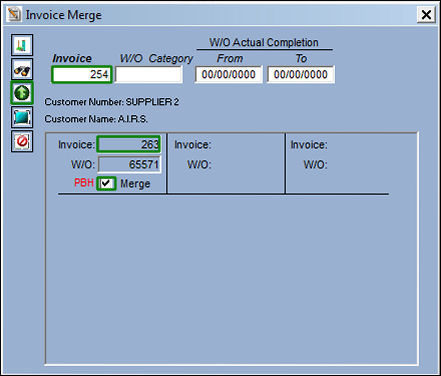
The following information/options are available in this window:
_____________________________________________________________________________________
Invoice
Enter the Invoice reference to query for.
W/O Category
Enter the Work Order Category to query for.
W/O Actual Completion (From-To) range
Enter the W/O Actual Completion Date (From-To) Range to query for.
Select All  button
Click on the Select All button to select all of the invoices in the below window.
Deselect All  button
Click on the Deselect All button to de-select all of the invoices in the below window.
PBH 
The Power by Hour indicator will appear when an invoice contains a PBH item in the invoice.
_____________________________________________________________________________________
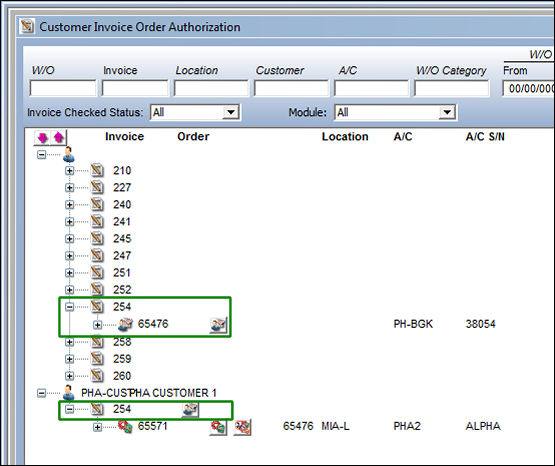
Once the invoices are merged, notice that invoice 263 is no longer listed and has now merged with invoice 254.
Share
Print
|
©1997-2026 Trax USA Corp. All rights reserved. This manual may not be copied, photocopied, reproduced, translated, or converted to any electronic or machine-readable form, in whole or in part, without prior written approval from Trax USA Corp. |
 |