
 Share
Share
 Print
Print
|
|
|
|
|


Shop Work Order, General Tab
The Shop Work Order, General Tab is used to query for Shop Work Orders based on the following search criteria. Enter any of the below search criteria to query for a desired Shop Work Order and select the Find  button.
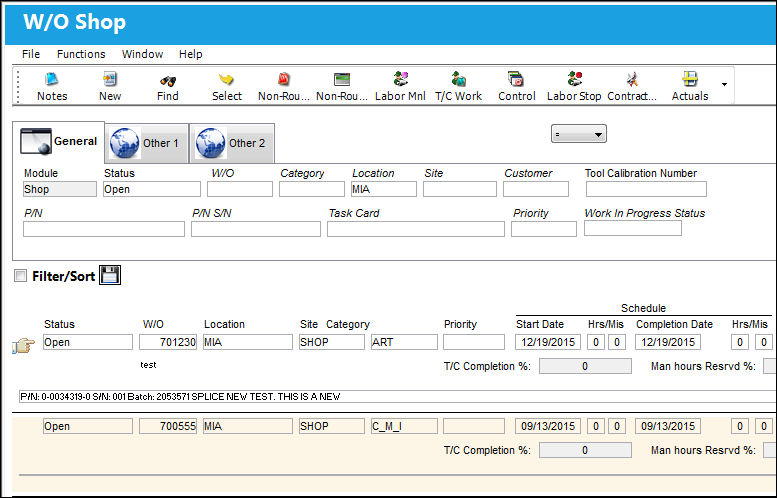
Query:
The following information/options are available in this window:
_____________________________________________________________________________________
Logic drop down 
Select one of the following logic functions to filter for data:
<= Less than or equal to.
<> Not equal to.
= Equal to.
>= Greater than or equal to.
Like Show data like or similar to.
Status
The status of the Shop Work Order.
W/O
The Shop Work Order reference number.
Category
The Shop Work Order Category.
Location
The Location for maintenance events, inventory stores, orders, transactions, or training events.
Site
The Site where the work is to be carried out (if applicable).
Customer
The customer for whom the Work Order was created.
Tool Calibration Number 
This is a unique number used to define a tool.
P/N
The Part Number reference for the aircraft part.
P/N S/N
The Serial Number for the specific serialized part.
Task Card
The Task Card / Job Card that details the scheduled maintenance work.
Priority
The priority of the Work Order (e.g., Urgent).
Work In Progress Status
Select a System Transaction Code to query by. This field is informational only and used for the purpose of querying for specific Work Orders.
_____________________________________________________________________________________
Results:
The following information/options are available in this window:
_____________________________________________________________________________________
Status
The status of the Shop Work Order.
W/O
The Shop Work Order reference number.
Description
The description of the Shop Work Order.
Location
The Location for maintenance events, inventory stores, orders, transactions, or training events.
Site
The Site where the work is to be carried out (if applicable).
Customer P.O.
For Third Party purchase, if purchase is on behalf of a customer the PO number may be entered here. Additional Use - if a Sales Order is generated in the system for the service requirement, it may cross reference here as well. This is to be defined by the company procedures. This does not invoice or charge the customer for any service provided. It is only used as a reference number.
Customer
The customer for whom the Work Order was created.
Created By
The user who created the record.
Category
The Shop Work Order Category.
Schedule T/C
The Task Card / Job Card that details the scheduled maintenance work.
N/R T/C
The Non-Routine Task Card that details non-scheduled maintenance work / findings.
N/R T/C Today
The number of Non-Routine Task Cards created and attached on the current date.
Reservation Status Indicator  button
The display of the Reservation Status Indicator  button allows planners to see when a part(s) has been reserved (all/partial/none).
Reservation Status Indicator  button - Indicates that all part requirements for the W/O have been reserved.
Reservation Status Indicator  button - Indicates that the part requirements for the W/O have only partially been reserved.
Reservation Status Indicator button - Indicates that a part that is required to complete the W/O has not yet been reserved.
Blue Reservation Status Indicator  button - Indicates that more material was added to the W/O after the previous requirements had been reserved.
Schedule Start Date
The date/time that the work is scheduled to begin. The Start Date does not affect whether the Work Order may be deleted or not. However, if the work has been started, the Work Order may not be deleted.
Completion Date
The date/time that the work is scheduled to be completed.
T/C Completion %
The total percentage of Task Cards that have been completed against the Work Order.
Man Hours Resrvd %
This is the total of reserved man hours (per man) to carry out the work. Formula = Man Hours x Men Required.
W/O Time Used %
The elapsed hours of the time taken to complete the work. (i.e. If a Work Order is scheduled for 6 days and was completed in 36 Man Hours, the W/O Time Used will equal 50%, because it only took 3 days to complete the work.)
TAT
The Time After Turnaround days. This field is only applicable for Third Party W/Os and is assigned through the associated Shop Customer Contract.
TAT Date
The Time After Turnaround date. This field is only applicable for Third Party W/Os and is assigned through the associated Shop Customer Contract.
_____________________________________________________________________________________
Share
Print
|
©1997-2026 Trax USA Corp. All rights reserved. This manual may not be copied, photocopied, reproduced, translated, or converted to any electronic or machine-readable form, in whole or in part, without prior written approval from Trax USA Corp. |
 |