
 Share
Share
 Print
Print
|
|
|
|
|


A/C P/N Transaction History Supervisor, General Tab
The A/C P/N Transaction Supervisor, General tab is used to query for A/C P/N Transaction records based on the following search criteria. As with the majority of the query selections on the system, it is better to select as many parameters as required to minimize user search results. Once the user has selected the criteria, click on the Find  button. The search result will appear.
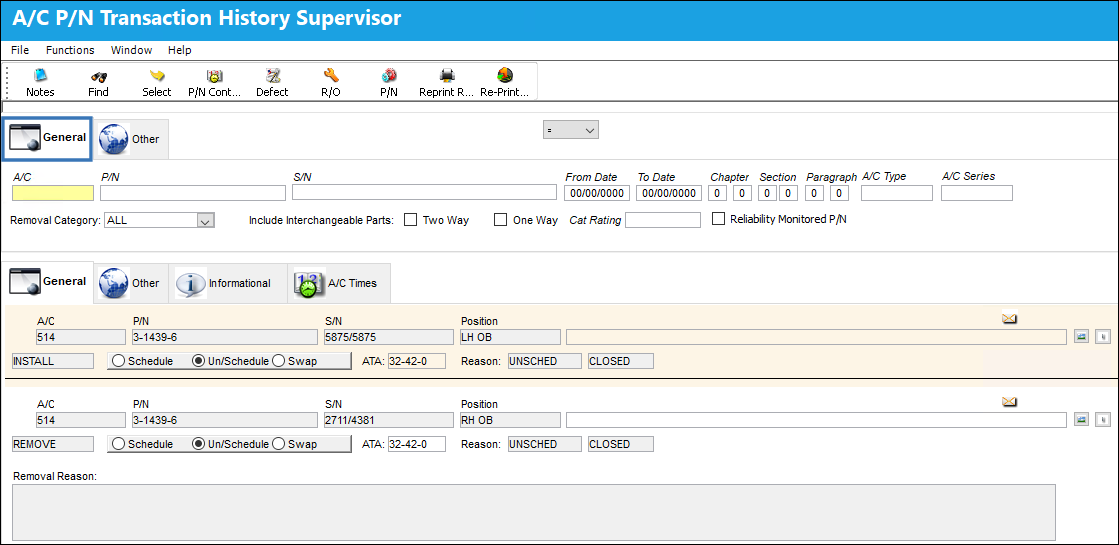
An image of the General Tabs for both query and record results may be viewed below.
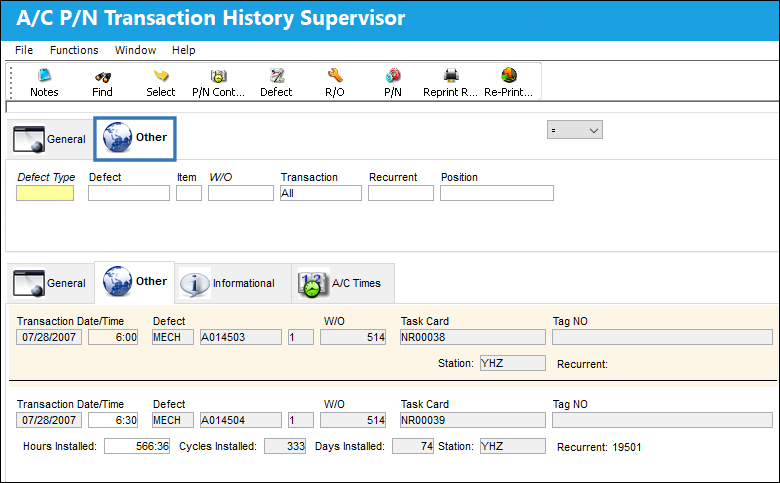
An image of the Other Tabs for both query and record results may be viewed below.
Query
The following information/options are available in this window:
_____________________________________________________________________________________
General Tab
A/C - The individual aircraft tail number.
P/N - The Part Number reference for the aircraft part.
S/N - The Serial Number for the specific serialized part.
From Date - Beginning Date for transaction history.
To Date - End Date for transaction history.
Chapter/Section/Paragraph - The ATA chapter/section/paragraph, as applicable.
A/C Type/Series - The Aircraft Type and Series/Fleet assignment.
Removal Category - Select the removal category with the drop down window (i.e. Schedule, Un/Schedule, Swap).
Include Interchangeable Parts checkbox - Select either Two Way or One Way.
Cat Rating - The CAT Rating is the description of the type of A/C landing system and is informational only.
Reliability Monitored P/N checkbox - Select this checkbox to have the Reliability module provide statistical data (on reports and Recurrent Alert Items) regarding the reliability of this particular part. Reports can then be filtered to display only parts that are “Reliability Monitored.”
Other Tab
Defect Type - The type of defect found on the aircraft (for example, Pilot Report, MX Report).
Defect - The defect number (or log book number).
Defect Item - The defect log item number.
W/O - The Work Order used to categorize, manage, and schedule work requirements for aircraft maintenance.
Transaction
All - All Part Numbers installed and/or removed.
Installed - Part Numbers installed.
Removed - Part Numbers removed.
Recurrent - If the P/N is part of a recurrent unscheduled removal, enter the recurrent number to find all related Part Number transactions. For more information, see the Reliability Training Manual.
Position - The related A/C position.
_____________________________________________________________________________________
Results
The following information/options are available in this window:
_____________________________________________________________________________________
General Tab
A/C - The individual aircraft tail number.
P/N - The Part Number reference for the aircraft part.
S/N - The Serial Number for the specific serialized part.
Position - The related A/C position.
Removal Category - Select the removal category with the drop down window (i.e. Schedule, Un/Schedule, Swap).
Schedule radio button - Select this radio button if this is a scheduled component change.
Unschedule Swap radio button - Select this radio button if this is an unscheduled component change.
ATA - The ATA chapter/section/paragraph, as applicable.
Reason Code - The reason for changing the part.
Other Tab
Transaction Date/Time - The Date and Time of the transaction (on the aircraft).
Defect Type - The type of defect found on the aircraft (for example, Pilot Report, MX Report).
Defect - The defect number (or log book number).
Defect Item - The defect log item number.
W/O - The Work Order used to categorize, manage, and schedule work requirements for aircraft maintenance.
Task Card - The Task Card / Job Card that details the scheduled maintenance work.
Tag NO - The tag number associated with the part.
Hours/Cycles/Days Installed - The number of hours/cycles/days accumulated on the part at the time of removal.
Station - The Station where the transaction will take place. Users are able create A/C P/N Transactions for locations that are Maintenance Facilities and NOT Station locations. Through printer configurations, labels for Serviceable and Unserviceable parts can be sent to different printers depending on the Station in the A/C P/N Transaction window. In previous releases, only the part's Location was considered.
Informational Tab
Created By - The user who created the record.
Created Date - The date the record was created.
Modified By - The user who last modified the record.
Modified By Date - The date the record was last modified.
A/C Times
A/C - The individual aircraft tail number.
P/N - The Part Number reference for the aircraft part.
S/N - The Serial Number for the specific serialized part.
Date - The date the transaction occurred.
A/C Hours - The number of hours accumulated on the aircraft at the time of the transaction.
A/C Cycles - The number of cycles accumulated on the aircraft at the time of the transaction.
_____________________________________________________________________________________
Share
Print
|
©1997-2026 Trax USA Corp. All rights reserved. This manual may not be copied, photocopied, reproduced, translated, or converted to any electronic or machine-readable form, in whole or in part, without prior written approval from Trax USA Corp. |
 |