
 Share
Share
 Print
Print
|
|
|
|
|


Select the Loan P/O  button to convert the Loan Order to a Purchase Order. Individual line items on the Loan Order can be changed to individual Purchase Orders.
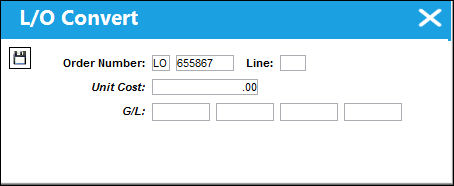
The following information/options are available in this window:
_____________________________________________________________________________________
Order Number
The Loan Order number to be converted to a Purchase Order. This Order Number defaults to the selected order in the L/O Header window. However, the L/O Number can be manually changed to another L/O Number even if that order is not in 'Open' Status.
Line
The specific Line number on the Loan Order to be converted.
Unit Cost
Enter the Unit Cost of the Loan Order that will be carried over to the Purchase Order. This cost does not have to be the same as the L/O Unit Cost.
G/L
The General Ledger code.
_____________________________________________________________________________________
The user is then presented with the Purchase Order window to convert the Purchase Order. Upon selecting the Save  button the conversion is completed. The Purchase Order will assume the same sequential number for the Loan Order.
 If invoicing has been conducted for the Loan Order, then at the conversion from Loan Order to Purchase Order, the Line Item at the Order level will be re-opened to allow for the invoicing to be conducted for the Purchase Order with the Journal Entry of the Loan Order being reversed after this action has been completed.
Additional Functionality:
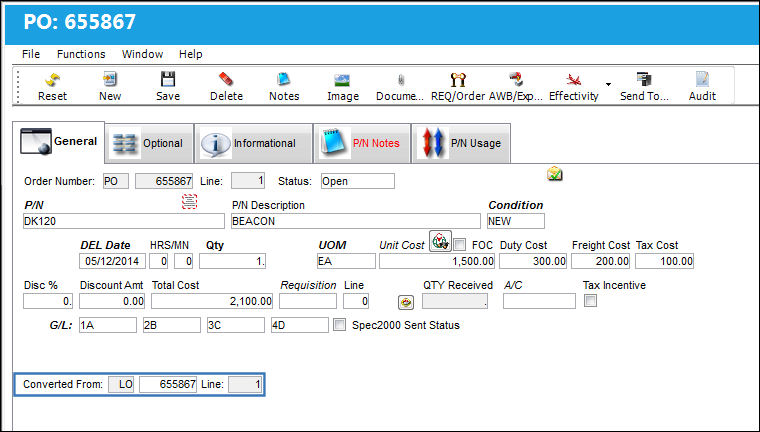
Once the Loan Order is converted to a Purchase Order, the Loan Order information is included in the newly created Purchase Order. For example, notice the the Order Number and Line number of the Loan Order. Once the Purchase Order is created, notice the Converted From information at the bottom of the Purchase Order window.
Share
Print
|
©1997-2026 Trax USA Corp. All rights reserved. This manual may not be copied, photocopied, reproduced, translated, or converted to any electronic or machine-readable form, in whole or in part, without prior written approval from Trax USA Corp. |
 |