
 Share
Share
 Print
Print
|
|
|
|
|


Work Order Bid Sheet, General Tab
The W/O Bid Sheet, General Tab is used to query for Bid Sheets based on the following search criteria. Enter any of the below search criteria to query for a desired Bid Sheet.
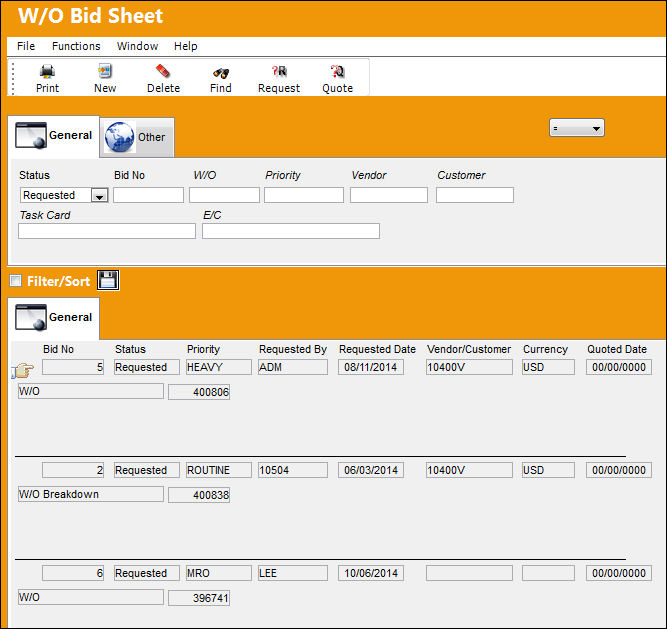
The following information/options are available in this window:
_____________________________________________________________________________________
Logic drop down 
Select one of the following logic functions to filter for data:
<= Less than or equal to.
<> Not equal to.
= Equal to.
>= Greater than or equal to.
Like Show data like or similar to.
Status drop down
Select the status of the Bid Sheet to query for:
- All
- No Quote
- No response
- Quoted
- Requested
Bid No
This is a system generated number which is assigned to the W/O Bid Sheet upon creation.
 WOBIDNO - The Work Order Bid Next Sequence Number Switch is sequential and does not have YES/NO functionality. Its purpose to keep track of the number of Work Order Bids created. The Config Number is updated every time a New Work Order Bid is requested.
Do not manually reset Config Number as this is set at implementation.
W/O
The Work Order used to categorize, manage, and schedule work requirements for aircraft maintenance.
Priority
The priority of the Bid Sheet.
Vendor
The system code for the service/part provider.
Customer
The customer who created the Bid Sheet.
Task Card
The Task Card / Job Card that details the scheduled maintenance work.
E/C
The Engineering Control that specifies aircraft or component scheduled maintenance intervals.
_____________________________________________________________________________________
Share
Print
|
©1997-2026 Trax USA Corp. All rights reserved. This manual may not be copied, photocopied, reproduced, translated, or converted to any electronic or machine-readable form, in whole or in part, without prior written approval from Trax USA Corp. |
 |