
 Share
Share
 Print
Print
|
|
|
|
|


TraxDoc Print
The TraxDoc Print option allows users to query for TraxDocs based on the following search criteria and send them to print.
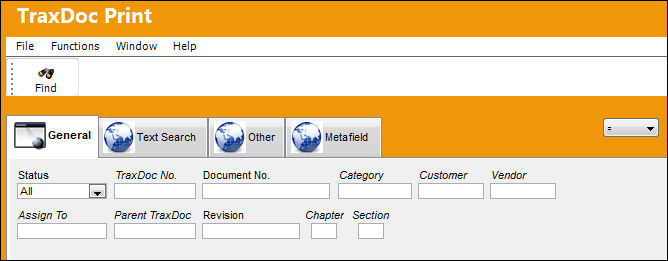
The following information/options are available in this window:
_____________________________________________________________________________________
Print Selection
Select one of the following Print options:
- TraxDoc Delta Print
- TraxDoc Detail Print
- TraxDoc Master Print
- TraxDoc TR Print
- TraxDoc Work Bench Print
Logic drop down 
Select one of the following logic functions to filter for data:
<= Less than or equal to.
<> Not equal to.
= Equal to.
>= Greater than or equal to.
Like Show data like or similar to.
Status
The Status of the TraxDoc to be queried for. Select from:
- Draft
- Open
- Terminated
- Pending
- All
TraxDoc No.
Select the TraxDoc number to be queried for.
Document No.
Enter the document's number to be queried for.
Category
Enter the document's category to be queried for.
Customer
Enter the Customer that the TraxDoc was created for.
Vendor
Enter the Vendor in which the TraxDoc was created from. (i.e. Boeing) to be queried for.
Assign To
Enter the employee the TraxDoc was assigned to to be queried for.
Parent TraxDoc
Enter the original TraxDoc number created to be queried for.
Revision
Select the Revision number of the TraxDoc to be queried for.
Chapter
Enter the ATA Chapter to be queried for.
Section
Enter the ATA Section to be queried for.
_____________________________________________________________________________________
Share
Print
|
©1997-2026 Trax USA Corp. All rights reserved. This manual may not be copied, photocopied, reproduced, translated, or converted to any electronic or machine-readable form, in whole or in part, without prior written approval from Trax USA Corp. |
 |