
 Share
Share
 Print
Print
|
|
|
|
|


From the Vendor P/N Information, Audit tab, users can view previously saved information for the part/vendor.
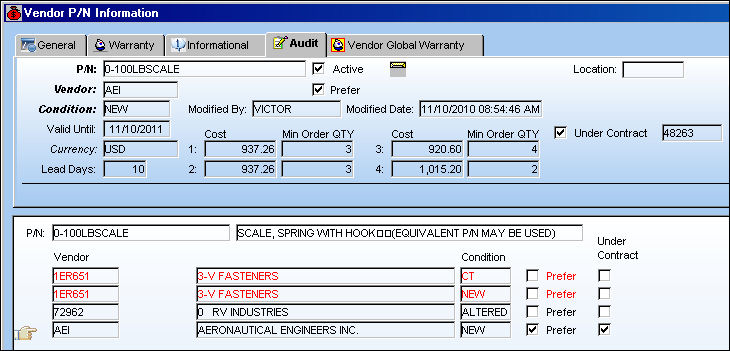
In TRAX Version 11 and all future releases, the Audit tab has been replaced by the Audit  button.
The following fields are informational only:
_____________________________________________________________________________________
P/N
The Part Number reference for the aircraft part.
Active checkbox
Selected if the P/N is active.
Vendor
The system code for the service/part provider.
Prefer checkbox
Indicates that this is the preferred Vendor for this P/N and Condition. This preferred Vendor information will be accessible via the Prefer Vendor P/N  button when creating Purchase Orders and Repair Orders. The button will appear on the Purchase and Repair Order detail.
Condition
The condition of the part.
Modified By
The user who last modified the record.
Modified Date
The date the record was last modified.
Location
The Location for maintenance events, inventory stores, orders, transactions, or training events.
Under Contract checkbox
Select if the part is under contract with the Vendor.
Requisitions created for this part and Preferred Vendor that have the Under Contract checkbox selected, the requisition in the Requisition Management window will labeled with the word  .
.
Contract
The Vendor Contract that the P/N is under. This field is only available when the Under Contract checkbox is selected.
Lead Days
The number of days specified by the vendor between the part's purchase date and the delivery date.
Valid Until
The valid until date.
Currency
The appropriate currency code.
Cost
The cost of the part.
Min Ord Qty
The minimum quantity to be ordered. This is determined either by the supplier or the purchasing department.
_____________________________________________________________________________________
Share
Print
|
©1997-2026 Trax USA Corp. All rights reserved. This manual may not be copied, photocopied, reproduced, translated, or converted to any electronic or machine-readable form, in whole or in part, without prior written approval from Trax USA Corp. |
 |