
 Share
Share
 Print
Print
|
|
|
|
|


The Pre-Receiving button via the Order Receiving window is available to aid in searching for items that were pre-received and are ready to go through the receiving process. This button directly links to the system's Pre-Receiving program. For further detail about the Pre-Receiving program, go to Pre-Receiving via the Receiving Training Manuals.
When the Pre-Receiving  button is selected, a drop down selection window will appear.
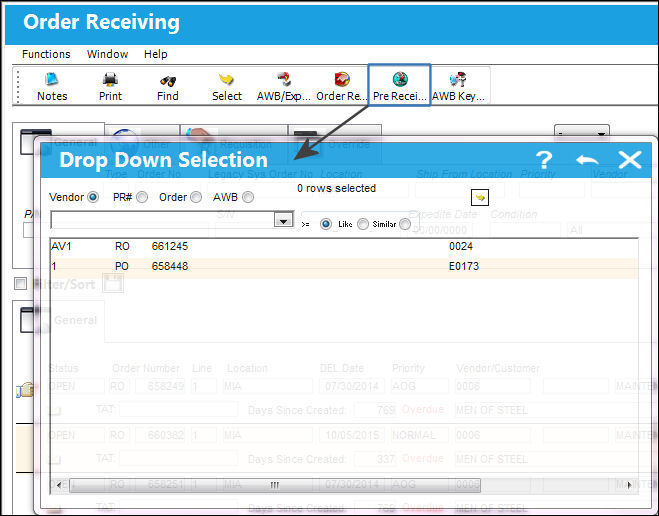
The records can be sorted through the following categories.
_____________________________________________________________________________________
Vendor
The system code for the service/part provider. Items can be sorted by a Vendor number. This will display all the items that were Pre Received by the vendor.
Pre-Receiving Number
Items can be sorted by Pre Receiving Number. This number is given when the item was Pre Received.
Order Number
Items can be sorted by the Order Number.
AWB 
Items can be sorted by Air Way Bill (AWB). If an item had an AWB attached when it was Pre Received, then it can be searched for by the AWB number for that item.
_____________________________________________________________________________________
Share
Print
|
©1997-2026 Trax USA Corp. All rights reserved. This manual may not be copied, photocopied, reproduced, translated, or converted to any electronic or machine-readable form, in whole or in part, without prior written approval from Trax USA Corp. |
 |