
 Share
Share
 Print
Print
|
|
|
|
|


In Inventory Transaction, select the Express Issue  button. TRAX displays the following screen.
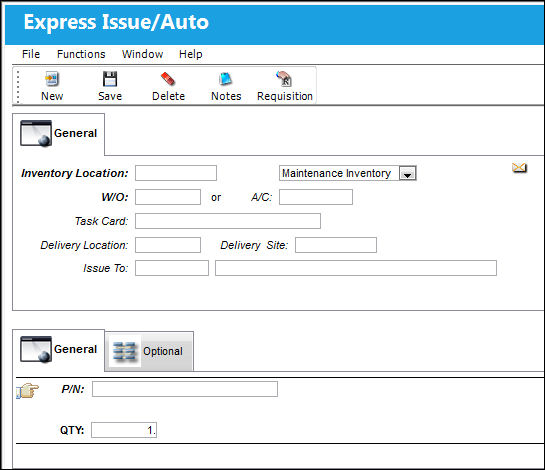
The following information/options are available in this window:
_____________________________________________________________________________________
Inventory Location
Inventory Location code.
Type of Inventory
The type of inventory the item is registered as in the system. The available options are All, General, GSE and Maintenance Inventory. All is set as the default.
W/O
The Work Order used to categorize, manage, and schedule work requirements for aircraft maintenance.
A/C
The individual aircraft tail number. The Aircraft type, in case the W/O is not known.
Task Card
The Task Card / Job Card that details the scheduled maintenance work. If the Work Order in which the Manual Issue is being performed against is Third Party, then the Task Card field will be Mandatory, appear bold and be required for the save of the record.
Delivery Location
The location to which the part(s) is being delivered.
Delivery Site
Site to which part(s) will be delivered.
Issue To
Party to which part(s) has/have been issued. The Issue To may be configured to be mandatory and validate the employee’s status for issue.
P/N
The Part Number reference for the aircraft part.
QTY
The actual quantities that are being issued.
_____________________________________________________________________________________
Process for the Completion of the Express Auto Issue:
- Scan the batch number using the bar code reader of the Part Tag.
- Scan the Work Order and the Task Card number. The system must have at least one Work Order and one Task Card created for the issue to take place.
- Then scan the ID Badge of the Issue To employee, where applicable or right click and to select the Issue To employee.
- Click on the Save
 button.
The system will produce a Manual Issue print, which can be printed if required.
Financial journal entries are written and the information is also stored on the Work Order.
Expendable/consumable parts are expensed to the Work Order, while rotable/ serialized units are not. The only time that rotable/ serialized units are expensed to the Work Order is when the Work Order the part is issued to a ‘Third Party’ Work Order at which point the part is sold to the customer as defined in the P/N Master, Unit Sell window. For additional information on how to set-up the unit sell price, please refer to the P/N Master, Setting Training Manual.
Users may also issue multiple lines/batches in one transaction in the system.
Select the New  button to add multiple parts to this transaction.
Select the Delete  button to delete a record.
Select the Save button to save a record.
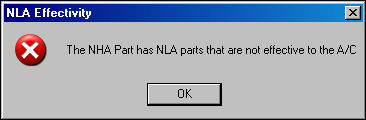
NLA Effectivity:
If the user attempts to issue an APU part where the APU is effective to an aircraft, but it's NLA does not have effectivity, the system will display the following error:
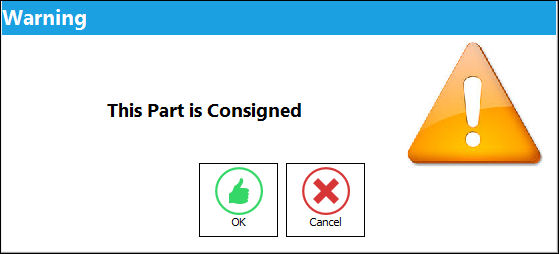
Issuing a Consigned Part Message:
If issuing a Consigned Part, the following soft warning will appear. For detailed information, refer to Issuing Consigned Inventory via the Inventory Training Manual.
Share
Print
|
©1997-2026 Trax USA Corp. All rights reserved. This manual may not be copied, photocopied, reproduced, translated, or converted to any electronic or machine-readable form, in whole or in part, without prior written approval from Trax USA Corp. |
 |