
 Share
Share
 Print
Print
|
|
|
|
|


PO/ E/X Receiving
Receiving/ Update/ Order Receiving
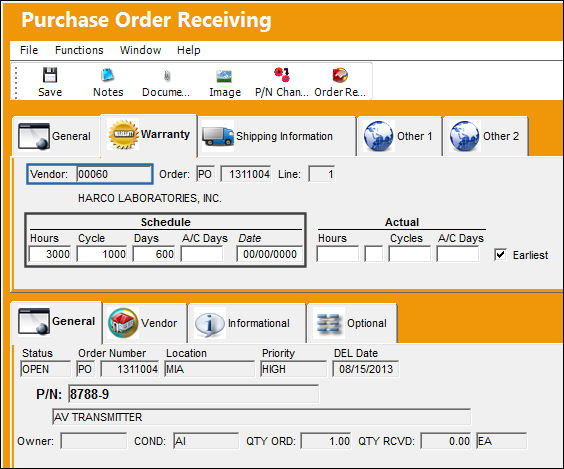
In the Purchase Order Receiving window, the Warranty tab will display the vendor warranty schedule.
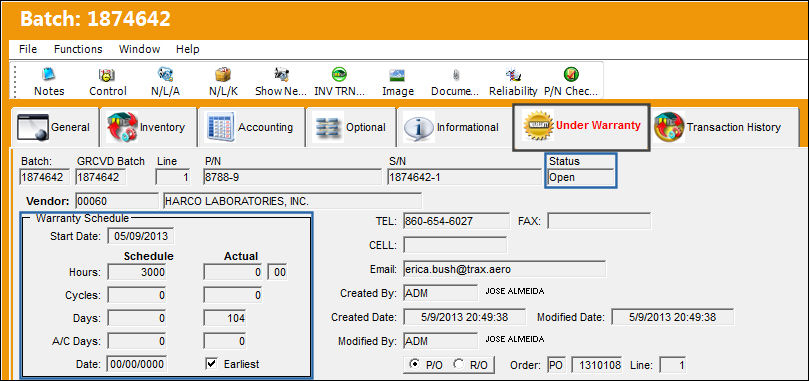
After the part is received and in inventory, the part will not be under warranty as displayed below in the Under Warranty tab. The Status field is set to 'Open' and is grayed out, only when the Actual Warranty times exceed the Warranty Schedule will the Status field change to 'Closed'.
Share
Print
|
©1997-2026 Trax USA Corp. All rights reserved. This manual may not be copied, photocopied, reproduced, translated, or converted to any electronic or machine-readable form, in whole or in part, without prior written approval from Trax USA Corp. |
 |