
 Share
Share
 Print
Print
|
|
|
|
|


Shop W/O Bid Sheet, General Tab
The Shop W/O Bid Sheet, General tab is used to query for Shop Bid Sheets based on the following search criteria. Enter any of the below search criteria to query for a desired Shop Bid Sheet.
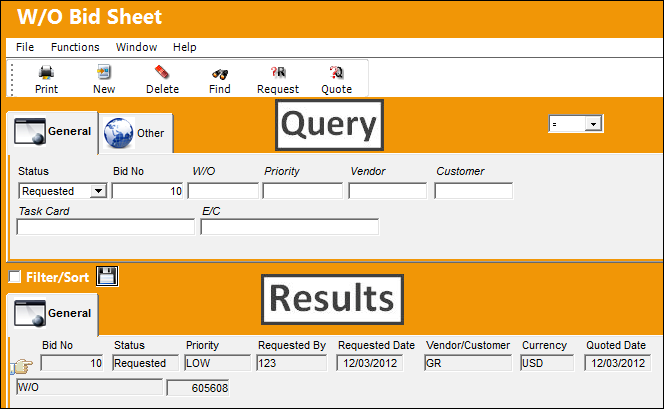
The following information/options are available in this window:
_____________________________________________________________________________________
Logic drop down 
Select one of the following logic functions to filter for data:
<= Less than or equal to.
<> Not equal to.
= Equal to.
>= Greater than or equal to.
Like Show data like or similar to.
Status drop down
Select the status of the Bid Sheet to query for:
- All
- No Quote
- No response
- Quoted
- Requested
Bid No
This is a system generated number which is assigned to the Shop W/O Bid Sheet upon creation.
 WOBIDNO - The Work Order Bid Next Sequence Number Switch is sequential and does not have YES/NO functionality. Its purpose to keep track of the number of Shop Work Order Bids created. The Config Number is updated every time a New Work Order Bid is requested.
Do not manually reset Config Number as this is set at implementation.
W/O
The Shop Work Order reference number.
Priority
The priority of the Bid Sheet.
Vendor
The Vendor selected to create Bid Sheet for.
Customer
The customer who created the Bid Sheet.
Task Card
The Task Card / Job Card that details the scheduled maintenance work.
E/C
The Engineering Control that specifies aircraft or component scheduled maintenance intervals.
_____________________________________________________________________________________
Share
Print
|
©1997-2026 Trax USA Corp. All rights reserved. This manual may not be copied, photocopied, reproduced, translated, or converted to any electronic or machine-readable form, in whole or in part, without prior written approval from Trax USA Corp. |
 |