
 Share
Share
 Print
Print
|
|
|
|
|


The Quote  button allows the vendor to create a quote for the work requested.
Once the Quote button has been selected, the Quotes window appears. This window allows the user to enter quotes for Bid Sheets per line item. The user may enter one or multiple items by selecting the New  button.
The information in the top half of the window cannot be updated from this window. If you would like to update any of the information in the Quote Rates section, this can be done by double selecting the W/O Bid Sheet via the W/O Bid Sheet window.
 Quote Rates:
The following fields are available in the Quote Rates section.
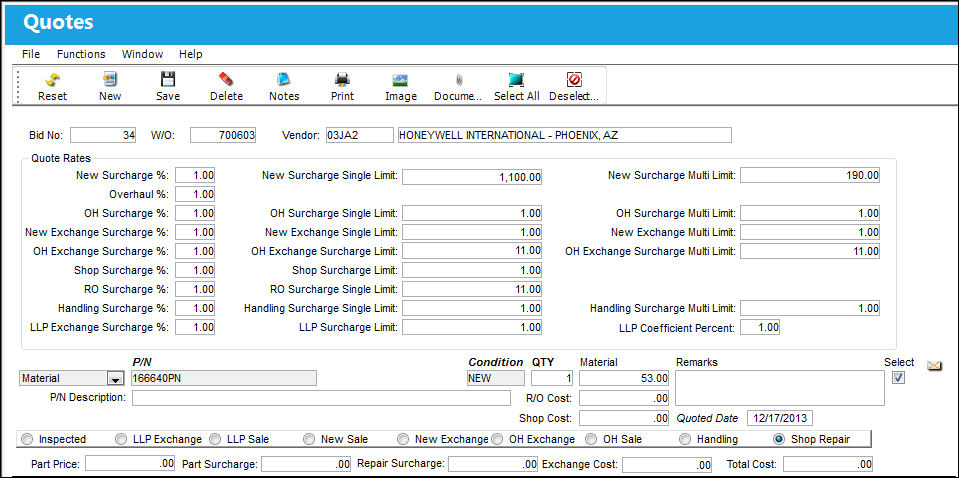
These rules only apply to the Material Bid Type. If the user does not intend to include a breakdown of materials in the quote, the fields under the Quote Rates section do not have to be populated. For additional information, refer to Material Bid Type, via the Quote Button.
Once all relevant information has been populated, save the record.
For detailed information regarding the different bid type options, along with their corresponding fields, refer to the following links:
Also, the following buttons offer additional functionality from this window:
Share
Print
|
©1997-2026 Trax USA Corp. All rights reserved. This manual may not be copied, photocopied, reproduced, translated, or converted to any electronic or machine-readable form, in whole or in part, without prior written approval from Trax USA Corp. |
 |