
 Share
Share
 Print
Print
|
|
|
|
|



When the Global checkbox is selected, the system will auto populate the related location on the Repair Order Header for all locations that are not Auto R/O defined.
Select one or more Quarantine Location(s). The Global field appears and is available for selection.
For all of the locations in the below window that do not have the select checkbox selected, the part will be received in the Global location even though these locations are not specified as Auto R/O locations.
Save your selection.
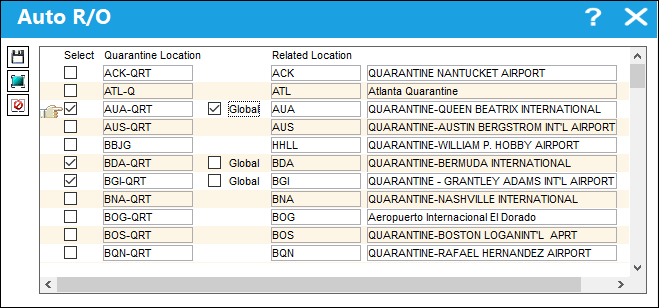
The following table illustrates how the selection of the Global checkbox will determine the Repair Order Location for a Quarantine Location:
Quarantine Location |
Related Location (Repair Order Location) |
AUA-QRT |
AUA (Global Vendor) |
BDA-QRT |
BDA |
BGI-QRT |
BGI |
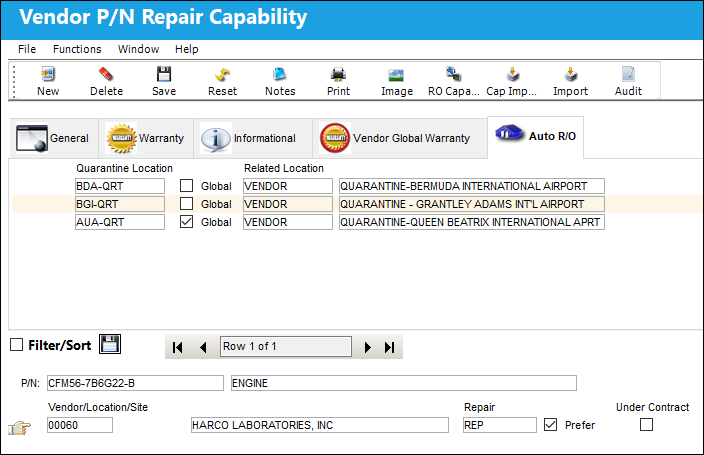
Once saved, this information will be available in the Auto R/O tab as shown below:
The user may not select more than one Global vendor:
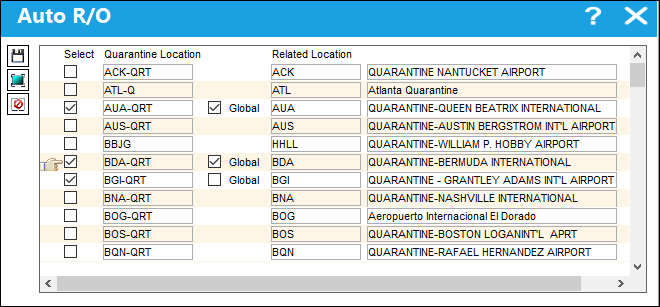
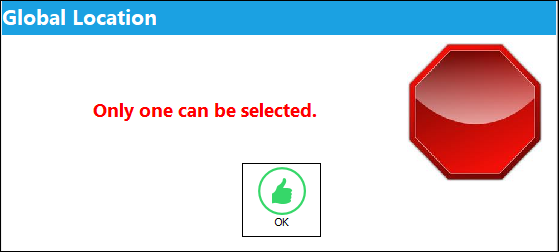
Upon save, the following hard warning appears:
Regardless of how many Vendors are associated to a Part Number, only one Global vendor can be established for a Part Number.
Share
Print
|
©1997-2026 Trax USA Corp. All rights reserved. This manual may not be copied, photocopied, reproduced, translated, or converted to any electronic or machine-readable form, in whole or in part, without prior written approval from Trax USA Corp. |
 |