
 Share
Share
 Print
Print
|
|
|
|
|


Set up Poisson Factor
Settings/ Update/ P/N Master, Inventory Tab
In the Inventory tab, select the Poisson Factor service level to designate to the part number.
Note: The Poisson Factor is a System Transaction Code, for additional information on the transaction code, refer to the Switch and Transaction Code Configuration portion of this manual.
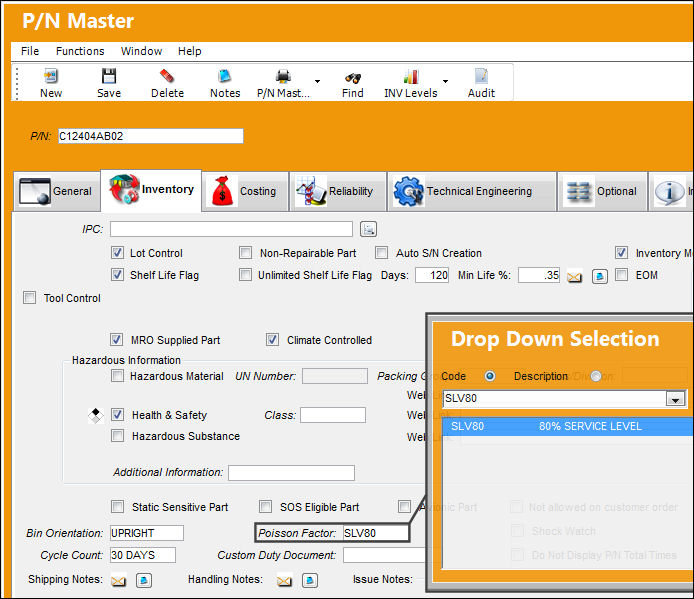
Enter/update the following information:
|
Poisson Factor |
The service level required for the part (which is taken into account for Re-Order calculations). The specific calculation rate is set in this System Tran Code option for each level (80%, 90%, 95% etc.). If this field is used, the system will factor this into the Re-Order Levels. See the System Tran Code (Poisson Factor) Section for additional information. The Poisson Factor field must contain a valid code in Order for the system to make correct Re-Order Level calculations. If the Poisson Factor field is left blank, the system will not make a calculation for that particular P/N. Alternatively, the user may prefer the set-up re-order levels in Inventory Levels. For additional information, please refer to the Inventory Level button section of this manual. |
Save the record.
Share
Print
|
©1997-2026 Trax USA Corp. All rights reserved. This manual may not be copied, photocopied, reproduced, translated, or converted to any electronic or machine-readable form, in whole or in part, without prior written approval from Trax USA Corp. |
 |