
 Share
Share
 Print
Print
|
|
|
|
|


Setup Lead Days
Settings/ Update/ P/N Master/ Cost Button
The Cost Button allows you to record Vendor's catalogue prices and Lead Days for parts. These may be supplied on a disk, which can be uploaded into the system. These prices will then be viewable from the Quotes option and when creating various types of orders.
In the Vendor P/N Information window, fill all the appropriate Vendor information and then enter the number of days that it will take to procure the part in the Lead Days field.
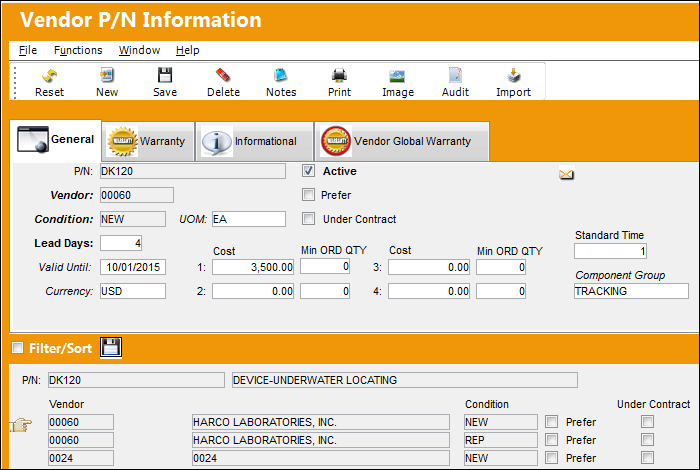
Enter/update the following information:
Release |
Field |
Function |
|
P/N |
The Part Number reference for the aircraft part. |
|
Active checkbox |
Select if the P/N is active. |
|
Vendor |
The Vendor who provided this part. |
|
Prefer checkbox |
Select to indicate that this is the preferred Vendor for this part. This preferred Vendor information will be accessible via the Prefer Vendor P/N |
|
Condition |
The condition of the part (New, Overhauled, etc.). |
|
UOM |
The unit of measurement of the part. |
|
Under Contract checkbox |
Select if the part is under contract with the Vendor. Note: Requisitions created for this part and Preferred Vendor are created with the Under Contract checkbox selected, the requisition in the Requisition Management window will labeled with the word |
|
Contract |
The Vendor Contract that the P/N is under. This field is only available when the Under Contract checkbox is selected (see above). |
|
Lead Days |
The number of lead days associated with this part. |
|
Valid Until |
The valid until date. |
|
Currency |
The appropriate currency code. |
|
Cost |
The cost of the part. |
|
Min Ord Qty |
The minimum quantity to be ordered. This is determined either by the supplier or the purchasing department. |
|
Automatically Send ROS Authorization Message checkbox |
Select this checkbox to have the system automatically send an ROS message to the vendor. |
|
Standard Time |
The estimated amount of hours it takes to start and complete work related to the part. This amount of time is used for customized reports that help evaluate Shop performance, including comparisons of estimated Standard Times verses actual times. This field is informational only. |
|
Component Group |
This field groups parts for the approved internal capability. This field is used in customized reporting that is provided to authorities and is informational only. |
 button when creating Purchase Orders and Repair Orders. The button will appear on the Purchase and Repair Order detail.
 .
.

Select the Save  button to save all information.
Share
Print
|
©1997-2026 Trax USA Corp. All rights reserved. This manual may not be copied, photocopied, reproduced, translated, or converted to any electronic or machine-readable form, in whole or in part, without prior written approval from Trax USA Corp. |
 |