
 Share
Share
 Print
Print
|
|
|
|
|


A/C Schedule Flight Option vs A/C Schedule Flight Daily
The A/C Planning Query (Planning/Query/A/C Planning Query) is the main center of operations for the Planning functionality.
The system will use either the A/C Schedule Flight option or the A/C Schedule Flight Daily option to store average (mean) flight hours and cycles for each A/C in the fleet.
The Mean Hours and Cycles MUST be entered. Without the Mean Hours and Cycles set-up, the A/C Planning Query will not work.
The Technical Records Switch  AC/SCHED is used to toggle between these two options.
As per the switch description, the Config Number field controls how many years the planning forecast will project.
The mean hours and cycles are then used by the A/C Planning Query to determine items that are due.
The mean hours and cycles represent the aircraft daily flight and cycles averages. Therefore, if an aircraft has 10 Hours and 5 Cycles entered in the A/C Schedule Flight or A/C Schedule Flight Daily, then planning will assume that the aircraft flies 10 hours and 5 cycles per day on its current route.
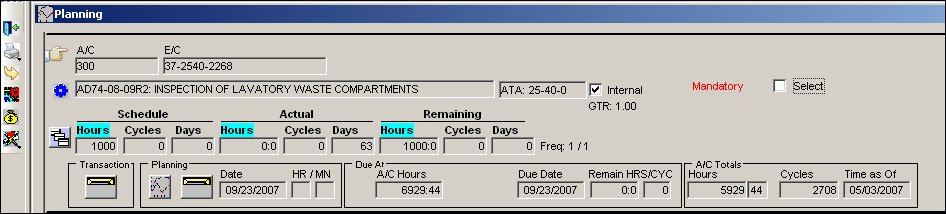
In the example above, there are 1000 hours remaining. The maintenance due print shows that the set-up in hours for this aircraft (A/C 300) is 10.00:
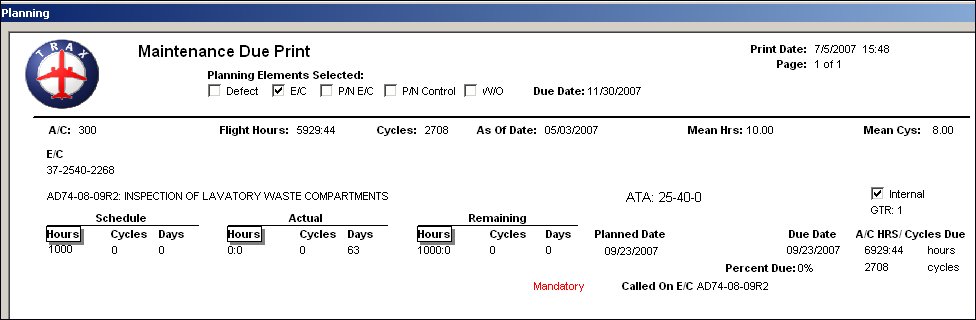
TRAX determines the remaining times by calculating the effective date of the planned maintenance event minus the actual flight times:
Schedule Hours |
Minus |
Actual Flight Hours from Effective Date/ Time |
Equals |
Remaining Hours |
1000 |
- |
86.54 |
= |
913.46 |
TRAX will calculate the due date based on the number of remaining hours and/or cycles factored by the mean hours set-up for each aircraft:
Hours Remaining |
Divided By |
Mean Hours |
Equals |
Number of Factored Days |
1000 |
/ |
10.00 |
= |
100.00 |
TRAX will add the factored number of days to today's date (the day on which the planning query is run) to come up with the due date:
Today's Date |
Plus |
Factored Days |
Equals |
Due Date |
07/05/2016 |
+ |
100 |
= |
10/13/2016 |
There is a different calculation for days driven items. These will have their due date calculated by adding the remaining number of days to today's date.
The A/C Planning Query program will take data from the following areas of the system and process it to determine due items:
- Engineering Module: Engineering Controls for Aircraft (e.g. ADs) and also for P/N's (e.g. SBs and Mods) are shown in the Planning Query. Due dates are calculated for each item.
- Technical Records Module: P/N Control information (such as TSN
 and TSO ) is processed when components are installed on aircraft, to determine removal time. Only those P/N Controls that have a schedule entered will appear in the Planning Query.
 - Deferred Defects: Defect items that are deferred, can be shown as part of the Planning forecast, due dates are calculated according to defer parameters.
- Inventory: Material requirements to carry out the items due in the Planning Query are evaluated and the status of part availability is provided. Material requirements must be set-up against the scheduled T/C(s) associated with P/N Controls, E/Cs and P/N E/Cs. For Defect Reports, the material requirements must be entered in the P/N Requirement List Tab before the defect is pulled into a W/O and becomes a non-routine T/C.
- Production: Manpower requirements are calculated according to the work required to carry out items due. Manpower requirements must be set-up against the scheduled T/C(s) associated with P/N Controls, E/Cs and P/N E/Cs. For Defect Reports, the Manpower requirements must be entered in the Defer Tab before the defect is pulled into a W/O and becomes a non-routine T/C.
TRAX will use either the A/C Schedule Flight option or the A/C Schedule Flight Daily option to store average (mean) flight hours and cycles for each A/C in the fleet. The mean hours and cycles are then used by the A/C Planning Query to determine items that are due. The decision as to which option is used is made based on individual organizational requirements.
See the A/C Schedule Flight and the A/C Schedule Flight Daily sections of this manual for additional information.
The user can use the Site Capacity Planning option to allow for the tracking of manhours for a specific employee. The employee must first be set-up in Settings/ Update/Employee Master. This option is normally used after the Manhour allocation has taken place.
The system can track manhours and then create a graphical display of the activity. The activity can be tracked either monthly or weekly. The 'Capacity Planning By: Week = (YES) or Month = (NO)' (PLANBY) switch is set to determine which is used.
Go to Planning/Query/A/C Planning Query. TRAX displays the following screen:
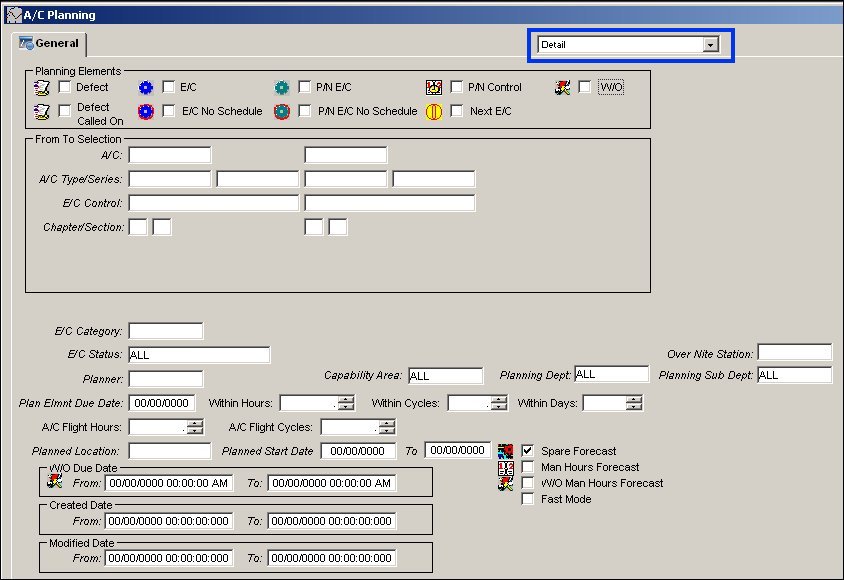
For complete details regarding fields in the above screen, go to the Aircraft Planning Query section of this manual.
Once the user has entered the parameters to be queried in the A/C Planning Query option, select the Find  button.
The A/C Planning Query Results are then displayed.
Share
Print
|
©1997-2026 Trax USA Corp. All rights reserved. This manual may not be copied, photocopied, reproduced, translated, or converted to any electronic or machine-readable form, in whole or in part, without prior written approval from Trax USA Corp. |
 |