
 Share
Share
 Print
Print
|
|
|
|
|


Shop W/O Closing
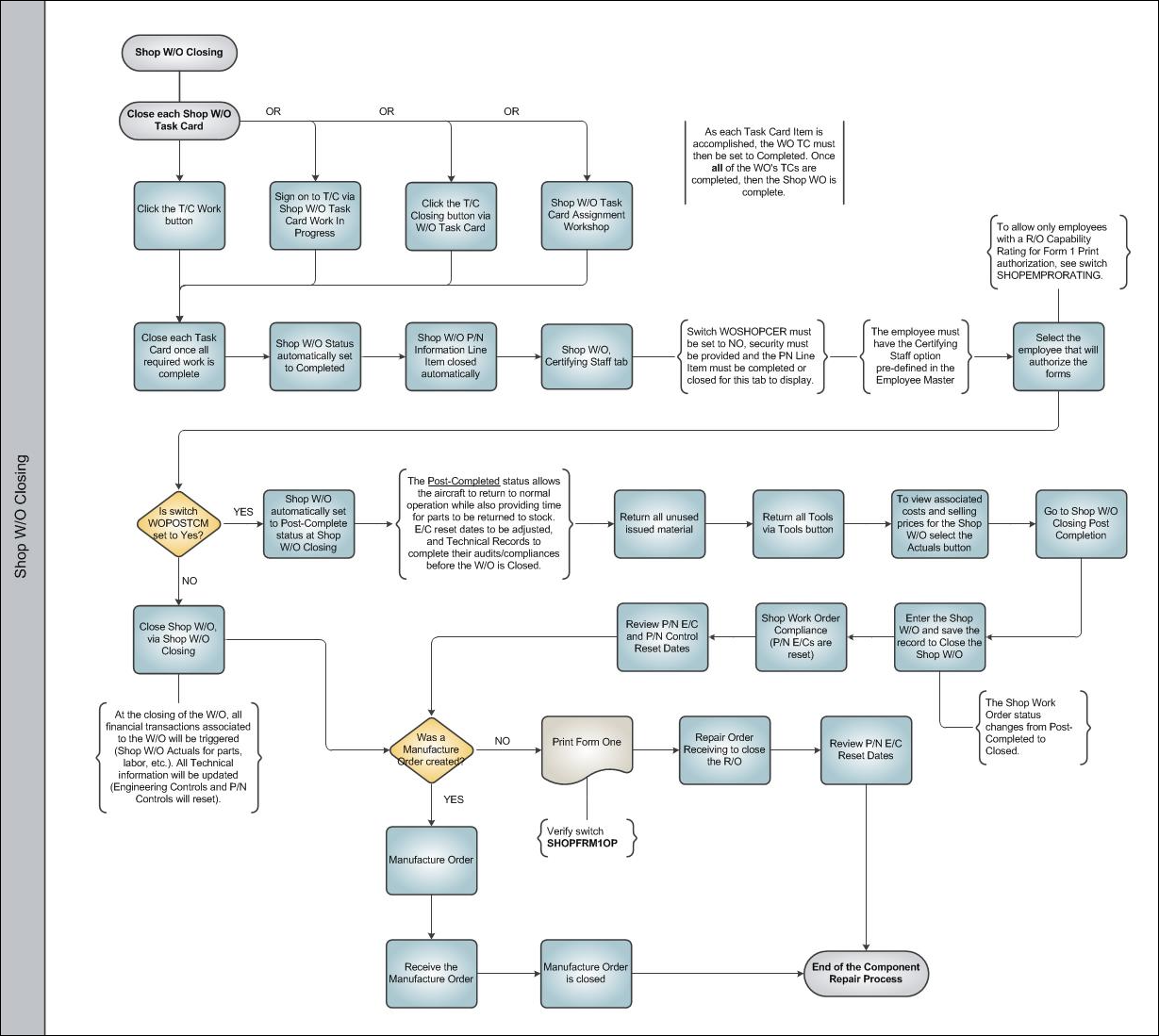
There are three stages of Shop Work Order status: Open, Completed, and Closed. Before closing a Shop Work Order, it must go from 'Open' to 'Completed' status (i.e. it cannot go from 'Open' directly to 'Closed'). Once a Shop Work Order has been 'Completed', the next stage is to Close the Shop Work Order. The closing performs three main functions:
- Updating all Technical Information (such as Engineering Control Compliance and P/N control data).
- Updating Financial Information (by moving data from Shop Work In Progress to final accounts).
- Removing Zero available consumable batches that are showing in inventory (on hold awaiting any return of unused parts from the Shop Work Order).
The following section will display step by step how to complete and proceed to close a Shop Work Order.
Share
Print
|
©1997-2026 Trax USA Corp. All rights reserved. This manual may not be copied, photocopied, reproduced, translated, or converted to any electronic or machine-readable form, in whole or in part, without prior written approval from Trax USA Corp. |
 |