
 Share
Share
 Print
Print
|
|
|
|
|


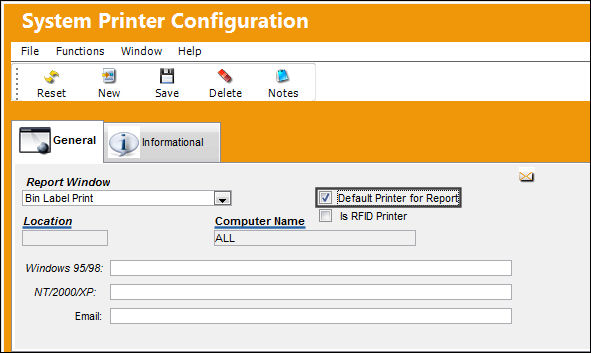
Select the Default Printer for Report checkbox
System Administration/ Update/ System Printer Control
When the Default Printer for Report checkbox is selected, the Location and Computer Name fields will automatically gray out. Enter the required information in the available fields displayed below. For more information on the additional fields, continue to Right-Click into the NT/2000/XP field.
Note: The Windows 95/98 field is only available when running Windows 95.
Continue on to, Is RFID Printer?
Share
Print
|
©1997-2026 Trax USA Corp. All rights reserved. This manual may not be copied, photocopied, reproduced, translated, or converted to any electronic or machine-readable form, in whole or in part, without prior written approval from Trax USA Corp. |
 |