
 Share
Share
 Print
Print
|
|
|
|
|


In order to create a new record select the New  button and fill all mandatory fields as well as all optional fields you want to populate.
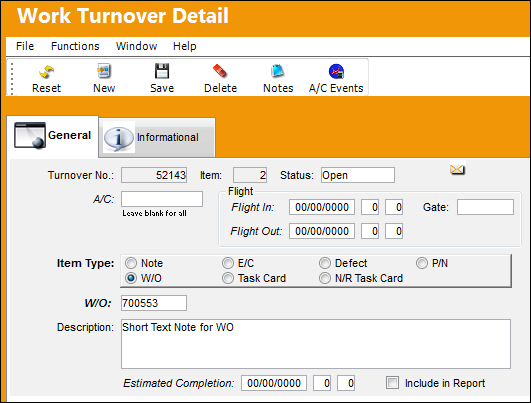
The following information/options are available in this window:
_____________________________________________________________________________________
A/C
The individual aircraft tail number. Leave blank if the work turnover record is for all aircraft at the selected location.
Flight In/Flight Out
Arrival and departure time of the aircraft.
Gate
The gate that the aircraft is at.
Item Type radio buttons
The type of record being created:
Note - A written note to the next shift leader, not associated with any work order or E/C.
W/O - The Work Order used to categorize, manage, and schedule work requirements for aircraft maintenance.
E/C - The Engineering Control that specifies aircraft or component scheduled maintenance intervals.
Task Card - The Task Card / Job Card that details the scheduled maintenance work.
Defect - The defect number (or log book number).
N/R Task Card  - The Non-Routine Task Card that details non-scheduled maintenance work / findings.
This option is only functional in the Production Control app.
P/N - The Part Number reference for the aircraft part.
This option is only functional in the Production Control app.
W/O
The Work Order used to categorize, manage, and schedule work requirements for aircraft maintenance.
Description
A description or note to summarize the record type created.
For each type, the Description-field is available. Only for a Note, it is mandatory.
Estimated Completion Date/Time
Estimated Completion Date/Time of the Work Order.
Include in Report
When this checkbox is selected, the information from the Work Over Turnover is included in the Production Control print.
This print is only available via the Production Control app.
_____________________________________________________________________________________
Share
Print
|
©1997-2026 Trax USA Corp. All rights reserved. This manual may not be copied, photocopied, reproduced, translated, or converted to any electronic or machine-readable form, in whole or in part, without prior written approval from Trax USA Corp. |
 |