
 Share
Share
 Print
Print
|
|
|
|
|


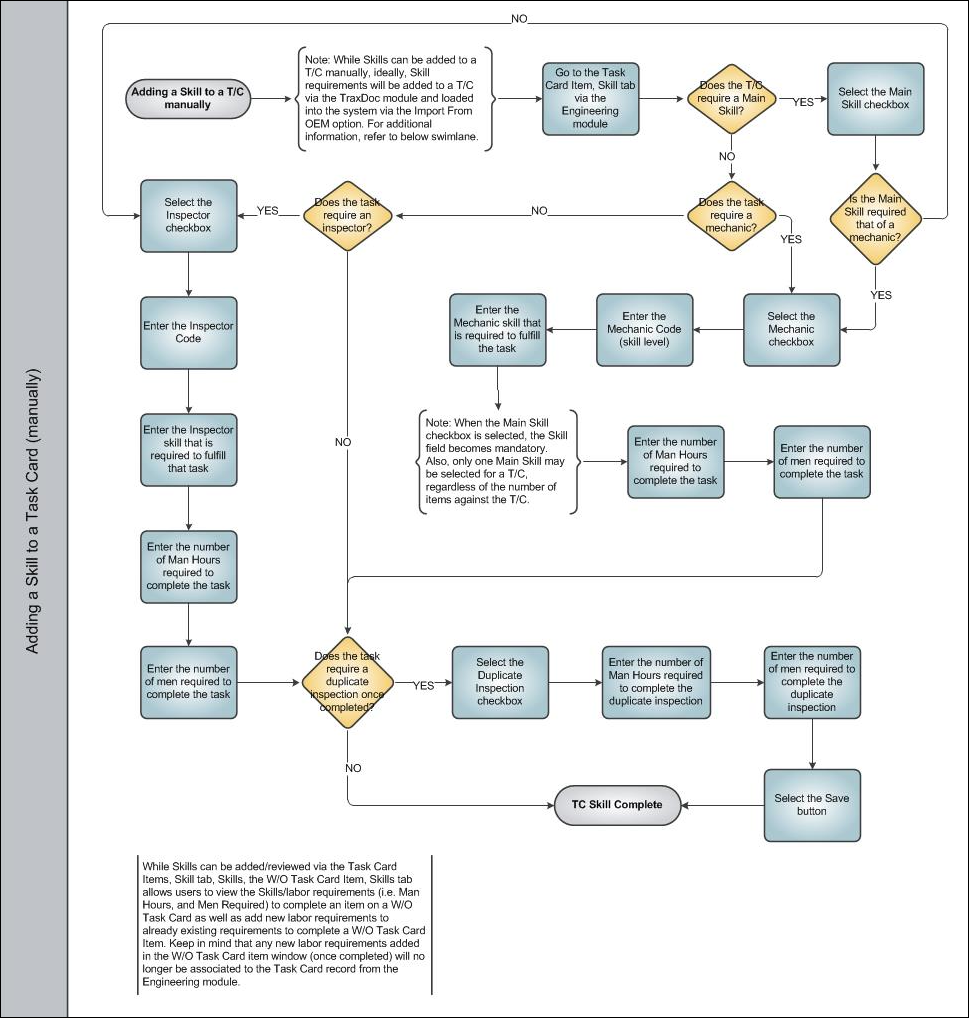
Adding a Skill to a T/C Manually
Skills are typically added to Task Cards before they are imported into TRAX through the TraxDoc module. Once imported, users can view/update the skills and other labor requirements via the Engineering module. Once a skill has been associated to a Task Card, the skill and other labor requirements will follow the Task Card throughout the system. These labor requirements can be modified for a specific Work Order Task Card item via the Production module, however once the task has been completed, the modified labor requirements will no longer be associated to the Task Card record from Engineering.
Share
Print
|
©1997-2026 Trax USA Corp. All rights reserved. This manual may not be copied, photocopied, reproduced, translated, or converted to any electronic or machine-readable form, in whole or in part, without prior written approval from Trax USA Corp. |
 |