
 Share
 Print
|
|
|
|
|


Part Number Explorer
The P/N Explorer window provides users with a streamlined set of inventory management options by allowing users to view parts based on different criteria (or views).
Follow these steps to access the relevant Batches:
- Use the fields in the top of the window to filter for the part that needs to be managed (see table below). These fields work as filters for the window. (No need to select the Find
 button at this point.)
- Expand from the list of categories/views.
- Any applicable batches corresponding to the filters entered in the fields above will be listed under the selected view. Key details for the part will be listed in the same line.
Note: If the view/category expanded does not contain any relevant Batches, then no records will be shown. (For example, if a S/N that is serviceable is filtered above, then that S/N will not appear if the Unserviceable (US) view is expanded.)
- At this point the Find button can be used to search for the relevant line item in this listing.
- The following options are available:
- Buttons: Select a batch line to select from a set of buttons. These buttons will allow users to perform various transactions that are available in the Inventory Transaction window. For more information refer to P/N Explorer Buttons.
- P/N Control / P/N E/C: Expand the line item to view any P/N Controls or P/N E/Cs that are linked to the component. The details of the P/N Control or P/N E/C will be listed in query-mode to the right. If the component is not linked to any controls, then 'No records found" will be displayed.
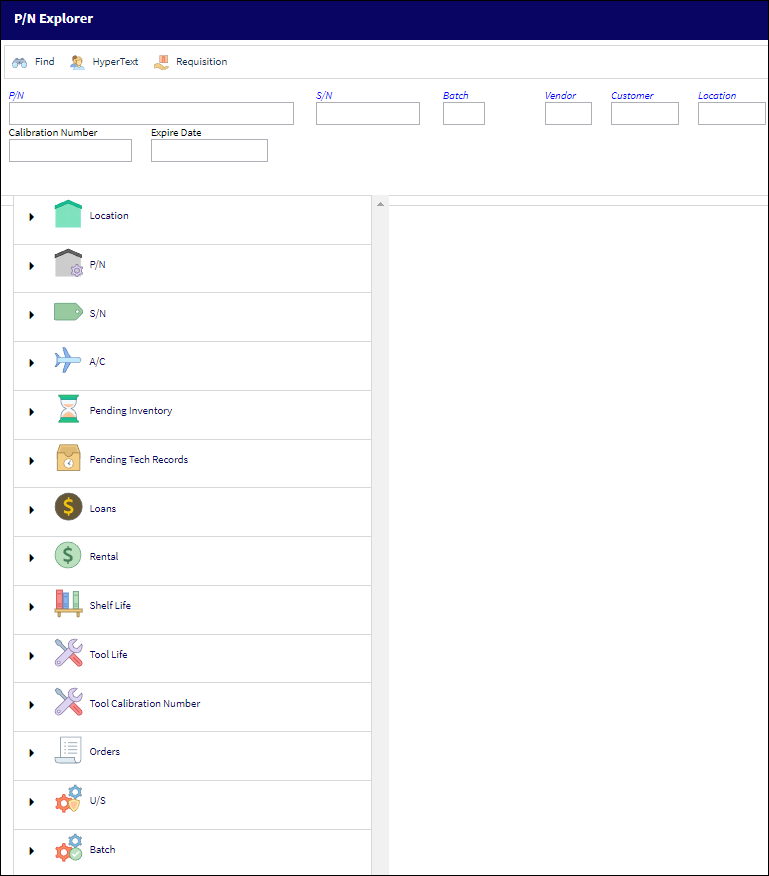
The following information/options are available in this window:
_____________________________________________________________________________________
P/N
The Part Number reference for the aircraft part.
S/N
The Serial Number for the specific serialized part.
Batch
The inventory number that is currently associated with a part or group of parts. A part's Batch number can change after various types of transactions take place.
Vendor
The system code for the service/part provider.
Customer
The customer the order is being placed with requiring the items.
Location
The location from which the order's items will be shipped.
Calibration Number
This is a unique number used to define a tool.
_____________________________________________________________________________________
Share
Print
|
©1997-2026 Trax USA Corp. All rights reserved. This manual may not be copied, photocopied, reproduced, translated, or converted to any electronic or machine-readable form, in whole or in part, without prior written approval from Trax USA Corp. |
 |