
 Share
 Print
|
|
|
|
|


About Re-Order Levels
The Re-Order point is established so that the system can automatically create requisitions for parts that have reached a certain quantitative level in inventory.
Purchasing action can then be considered. Re-Order levels are defined at the P/N level (Settings/P/N Master/Inventory Level Button).
The Re-Order Level that is calculated by the system is a result of the following formula:

Re-order Level field formula description
[The number of parts that have been issued in the past year divided by 365 days] * [Lead days for the P/N's Vendors (which is the average taken from the Vendor P/N Information window in Settings/ Update/P/N/ Interchangeable Button/ Cost Button/ Lead Days field). It calculates the average lead days regardless of Condition or Vendor in case the user has several set up for the P/N.] * [Poisson Factor].
Note: The formula that is used to calculate the Re-order Level includes the Poisson factor.
The Poisson Factor number represents the service level required for the part. A specific Poisson Factor number is associated with each specific “percentage of probability that a part will be available in inventory”. The Poisson Factor numbers and their associated percentages are set up in Settings/Explorer/System Transaction Code/Settings/Poisson Factor (80% Service Level, 90%, 95% etc.).
The Poisson Factor Equation follows.
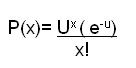
Where 'U' equals the mean, 'x' is the sample/population and 'e' is equal to a given number of 2.718.
Examples:
Service Level |
Poisson Factor |
Service Level |
Poisson Factor |
50% |
0.00 |
90% |
1.28 |
55% |
0.13 |
91% |
1.34 |
60% |
0.25 |
92% |
1.41 |
65% |
0.39 |
93% |
1.48 |
70% |
0.52 |
94% |
1.55 |
75% |
0.67 |
95% |
1.64 |
80% |
0.84 |
96% |
1.75 |
81% |
0.88 |
97% |
1.88 |
82% |
0.92 |
98% |
2.05 |
83% |
0.95 |
99% |
2.33 |
84% |
0.99 |
99.5% |
2.58 |
85% |
1.04 |
99.6% |
2.65 |
86% |
1.08 |
99.7% |
2.75 |
87% |
1.13 |
99.8% |
2.88 |
88% |
1.17 |
99.9 |
3.09 |
89% |
1.23 |
99.99% |
3.72 |
The Poisson Factor field must contain a valid code in the P/N Master (Settings/Update/P/N/ Inventory tab) in order for the system to make correct Re-Order Level calculations. If the Poisson Factor field is left blank, the system will not make a calculation for that particular P/N.
Centralized Location option (Location/ Update/ Location):
This location will be the main warehouse for parts marked accordingly (in P/N Master). When working with a centralized location, the average usage of parts of the outstations will also be taken into consideration when calculating the reorder level.
 Note: The Centralized Location checkbox functionality is no longer available in eMRO v7. Instead, multiple Locations can be configured as centralized locations. The Centralized Location checkbox functionality is no longer available in eMRO v7. Instead, multiple Locations can be configured as centralized locations. These multiple central locations will then feed the formula for Reorder Levels. For more information refer to the Centralized Routing Button, via Location Master.
Share
Print
|
©1997-2026 Trax USA Corp. All rights reserved. This manual may not be copied, photocopied, reproduced, translated, or converted to any electronic or machine-readable form, in whole or in part, without prior written approval from Trax USA Corp. |
 |