
 Share
 Print
|
|
|
|
|


ATA Chapter, General Tab
The system displays the ATA Chapter Screen (General Tab), as follows:
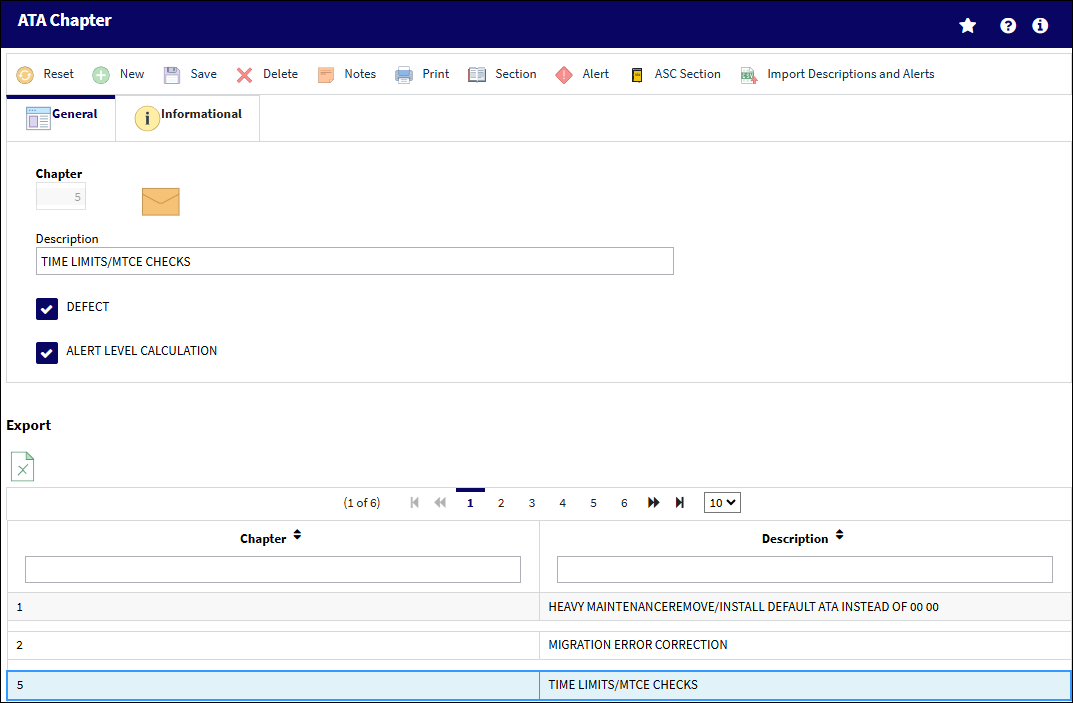
The following information/options are available in this window:
_____________________________________________________________________________________
Chapter
The ATA Chapter number required.
Section
The Section number for the ASC code.
Description
The description for the ATA Chapter.
Defect checkbox
Check this box if you want this Chapter/Section to appear in the list of available chapters/sections to choose from when creating a new Defect Report. You can create a new Defect Report in Technical Records/ Update/ Defect Report.
ETOPS checkbox
Check to indicate that this Section number is ETOPS “significant." When Defect Reports are created that contain the ETOPS rated Sections, the 'ETOPS Event Defect Report Print' (via Technical Records/ Print/ Defect Report Print) can be run to view those particular Defects.
Alert Level Calculation checkbox
Select if you want this ATA's Alert Level to be automatically updated when the Alert Level Recalculation task is performed via Reliability /Print/ Alert Level Recalculation.
_____________________________________________________________________________________
The Export as Excel  button can be selected to view the queried data (including all pages) in an Excel spreadsheet. This Excel file can be saved for later use. For more information refer to the Export as Excel Button via the eMRO System Standards manual.
Complete all Chapter entries that are necessary, so that future users will have all required information available for their use.
Share
Print
|
©1997-2026 Trax USA Corp. All rights reserved. This manual may not be copied, photocopied, reproduced, translated, or converted to any electronic or machine-readable form, in whole or in part, without prior written approval from Trax USA Corp. |
 |