
 Share
 Print
|
|
|
|
|


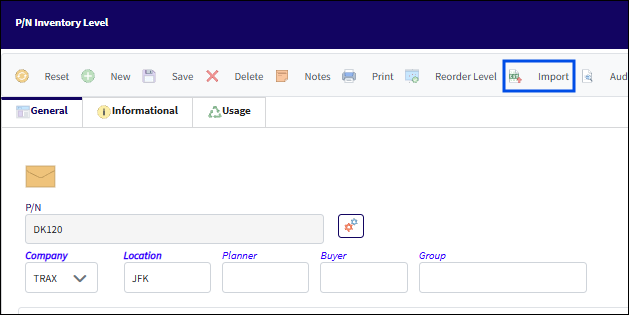
The Import  button appears throughout the system and is used to quickly import files that do not exist in the system. The same process can be applied to any import found within the system.
From the P/N Inventory level window, select the Import button. The system displays the Import From File window.
From the Import From File window complete all of the Import steps.
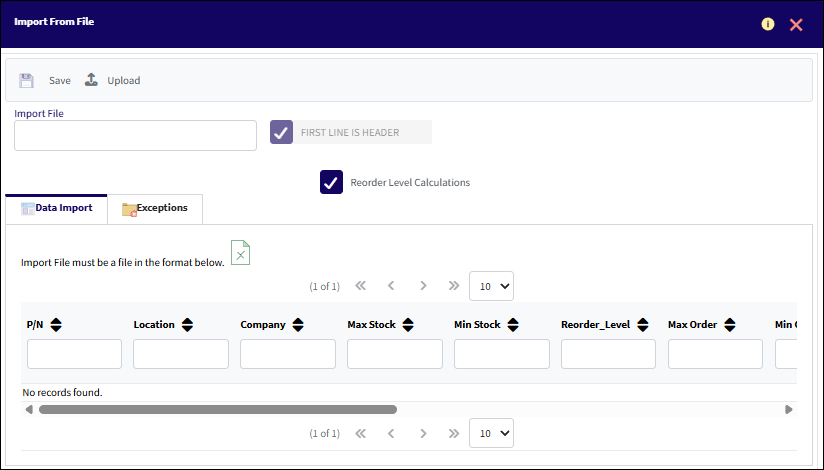
For information regarding how to Import a file, refer to Importing a File via Import Button of the System Standards Training Manual.
 Note: Users can enable or disabled the automatic Requisitions functionality by selecting or deselecting (respectively) the Reorder Level Calculations checkbox in the Import From File window. For more information on how the Reorder Level Calculations functionality works, refer to the Calculate Reorder Level button within the P/N Inventory Level, General Tab.
Before proceeding with the following import, refer to the initial steps which have been outlined via the Import Button, via the Standard Buttons which can be found in the System Standards Training Manual.
Note: Import files for eMRO should be saved as .csv (comma delimited) or .xlsx and cannot have spaces in the title of the file. Spaces in the file path will cause errors when importing.
Criteria for P/N Inventory Level Import file:
Version |
Column Name |
Data Type |
Limitation |
Path |
|
Company |
Alphanumeric |
8 |
Settings/Update/P/N Master/Inventory Levels Button. |
|
P/N |
Alphanumeric |
25 |
Settings/Update/P/N Master/Inventory Levels Button. |
|
Location |
Alphanumeric |
8 |
Settings/Update/P/N Master/Inventory Levels Button. |
|
Max Stock |
Numeric |
6 |
Settings/Update/P/N Master/Inventory Levels Button. |
|
Min Stock |
Numeric |
6 |
Settings/Update/P/N Master/Inventory Levels Button. |
|
Reorder Level |
Numeric |
6 |
Settings/Update/P/N Master/Inventory Levels Button. |
|
Max Order |
Numeric |
6 |
Settings/Update/P/N Master/Inventory Levels Button. |
|
Min Order |
Numeric |
6 |
Settings/Update/P/N Master/Inventory Levels Button. |
|
Planner |
Alphanumeric |
10 |
Settings/Update/P/N Master/Inventory Levels Button. |
|
Buyer |
Alphanumeric |
10 |
Settings/Update/P/N Master/Inventory Levels Button. |
|
EOQ |
Numeric |
6 |
Settings/Update/P/N Master/Inventory Levels Button. |
|
Trigger Requisition |
Y/N |
1 |
Settings/Update/P/N Master/Inventory Levels Button. |
|
Group |
Alphanumeric |
N/A |
Settings/Update/P/N Master/Inventory Levels Button. |
|
POU |
Y/N |
1 |
Settings/Update/P/N Master/Inventory Levels Button. |
|
Review Date |
Numeric |
N/A |
Settings/Update/P/N Master/Inventory Levels Button. |
 Share
Print
|
©1997-2026 Trax USA Corp. All rights reserved. This manual may not be copied, photocopied, reproduced, translated, or converted to any electronic or machine-readable form, in whole or in part, without prior written approval from Trax USA Corp. |
 |