
 Share
 Print
|
|
|
|
|


This option allows the user to create a listing of Locations and Vendors with their repair capability and pricing. This information can be electronically loaded (via system conversion). These prices are viewable from the Repair Quotes option. The user would then select the P/N to enter capability. Select the R/O Capability  button, enter or change the details required.
The following tabs and buttons are available.
Vendor P/N Repair Capability Tabs |
Vendor P/N Repair Capability Buttons |
|
 New button
 Delete button
 Reset button


Example: Creating an R/O via the R/O Capability Functionality
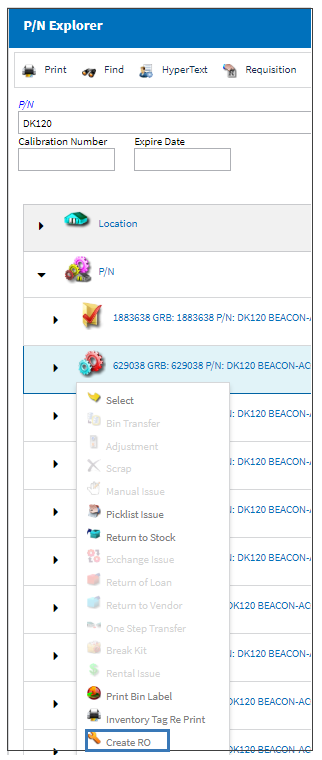
Go to Inventory/Explorer/P/N Explorer.
Select the 'Create R/O' option.
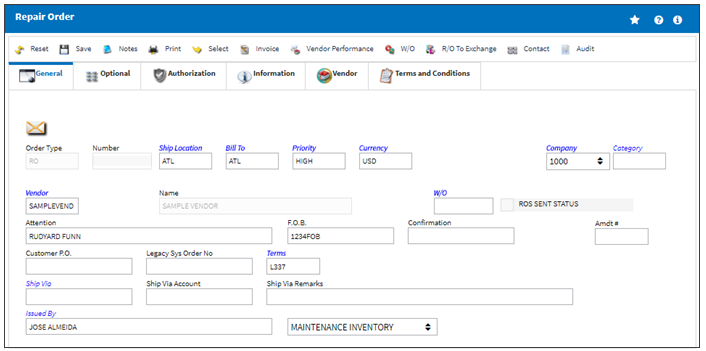
The system displays the Repair Order window.
Note: The Preferred Vendor information is auto populated from the Vendor P/N Repair Capability window.
Populate all required information and select the Save  button.
The system displays the Repair Order Detail window.
Note: The Preferred Vendor information is auto populated from the Vendor P/N Repair Capability window.
Populate all required information and select the Save button.
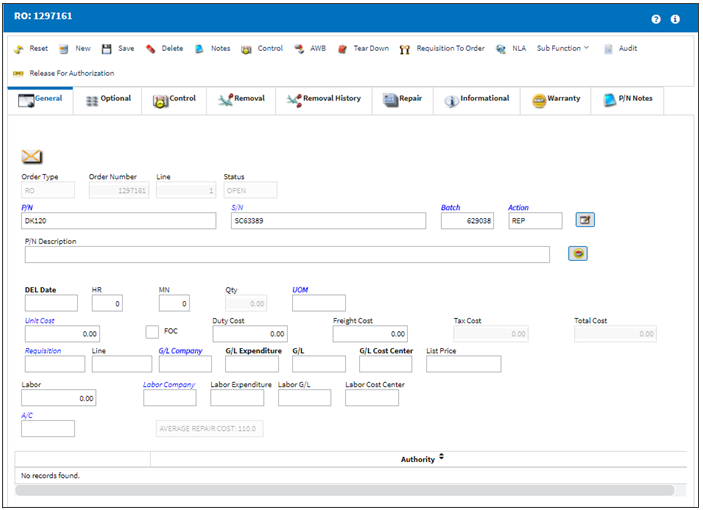
The Repair Order is created successfully using the R/O Capability button:
Share
Print
|
©1997-2026 Trax USA Corp. All rights reserved. This manual may not be copied, photocopied, reproduced, translated, or converted to any electronic or machine-readable form, in whole or in part, without prior written approval from Trax USA Corp. |
 |