
 Share
 Print
|
|
|
|
|


Insurance Claim
Insurance Claim information can be entered into and stored on the system. The Insurance Claim information can then be associated with Production, Shop, and GSE Work Orders, Non-Routine Task Cards, and with various orders if required (L/O, E/X, P/O, S/V, and R/O). Refer to the Insurance Claim Overview section below.
Within the Insurance Claim Header, the following tabs and buttons are available.
Insurance Claim Header Tabs |
Insurance Claim Header Buttons |
|
|

 New button
 Find button
 Select button
Within the Insurance Claim Detail, the following tabs and buttons are available.
Insurance Claim Detail Tabs |
Insurance Claim Detail Buttons |
|
 Save button
 Delete button

Insurance Claim Overview
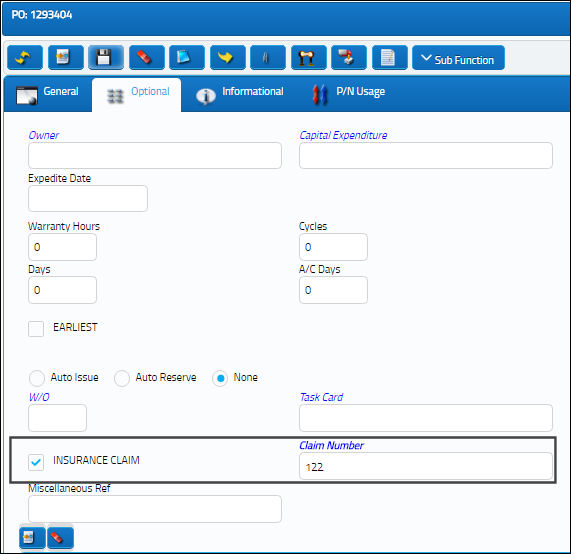
Once the Work Order, Non-Routine Task Card, or Order Detail is created, the Insurance Claim checkbox can be selected from the relevant Optional tab, then the relevant Insurance Claim number is entered.
The total cost of the order, Work Order, or Non-Routine Task Card will appear in the Insurance Claim for collection from the relevant insurance company.
Insurance Claims may be associated to Work Order, W/O Task Cards, W/O Non-Routines, and various Order Types including Purchase Orders as seen below:
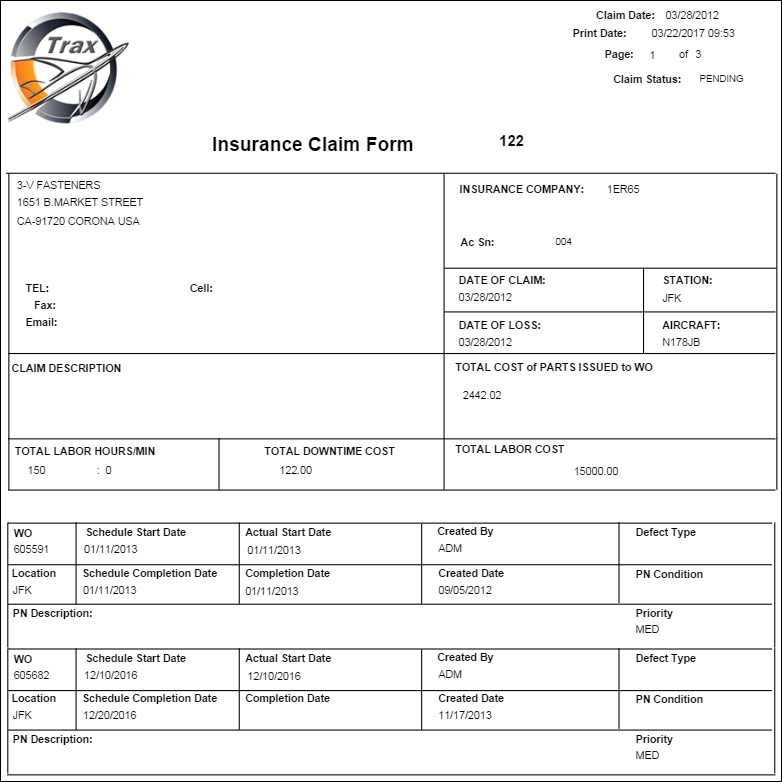
Once all items (costs) associated to the Insurance Claim have been attached you will have the option of printing (Print  button) or e-mailing (E-mail
 button) the claim from the Insurance Claim window to the Insurance Company for payment as seen below:
 Share
Print
|
©1997-2026 Trax USA Corp. All rights reserved. This manual may not be copied, photocopied, reproduced, translated, or converted to any electronic or machine-readable form, in whole or in part, without prior written approval from Trax USA Corp. |
 |