
 Share
 Print
|
|
|
|
|


Physical Inventory Print
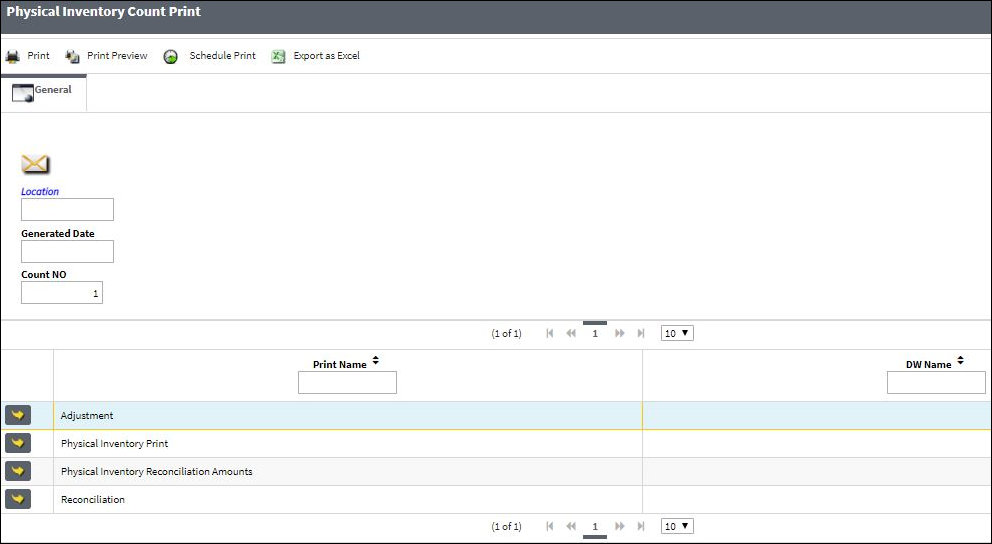
The Physical Inventory Print Window allows the user to print and then view reports that contains Physical Inventory information.
 This window and the print options in this window are security controlled via Security Explorer/ Inventory/ Print/ Physical Inventory Print. For additional information, refer the the Security Explorer, via the System Administration Training Manual.
Note: These are customized prints. Print layouts and options may vary per operator.
The following information/options are available in this window:
_____________________________________________________________________________________
Location
The Location for maintenance events, inventory stores, orders, transactions, or training events.
Generated date
The date on the Physical Inventory Count print that the count was generated.
Count NO
Once the Physical Count sheet is printed, a manual count must be done to confirm the actual quantities. Inventory personnel will now enter quantities into the Count field located on the Physical Inventory Count print.
Sort 
The Sort function allows the user to select what fields will be visible in the Physical Inventory Count Print.
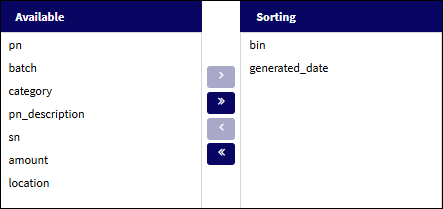
Note: The Sort function is only available for 'Adjustment', 'Physical Inventory Print', 'Physical Inventory Reconciliation Amounts', and 'Reconciliation' Prints.
_____________________________________________________________________________________
The Print  button is used to generate the report in the Print Queue. For more information, please refer to the Print Queue topic.
The Print Preview  button can be selected to view a pdf sample of the print. This preview opens in a new window.
The Schedule Print  button can be selected to allow users to schedule specific prints with unique filters to be automatically generated through a pre-configured schedule. For more information, please refer to the Schedule Print button topic.
The Export as Excel  button can be selected to view the queried data (including all pages) in an Excel spreadsheet. This Excel file can be saved for later use. For more information refer to the Export as Excel Button via the eMRO System Standards manual.
 Note: The Export as Excel print functionality is security controlled via System Administration/Update/Logged In Session/Excel Export Functionality. For more information, refer to the Security Explorer via the System Administration Training manual.
Share
Print
|
©1997-2026 Trax USA Corp. All rights reserved. This manual may not be copied, photocopied, reproduced, translated, or converted to any electronic or machine-readable form, in whole or in part, without prior written approval from Trax USA Corp. |
 |