
 Share
 Print
|
|
|
|
|


Read & Sign Detail, General Tab
Upon selecting a Request Number, the following General tab is displayed.
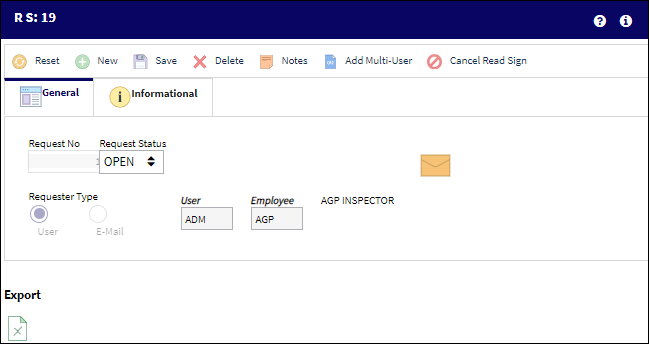
The following information/options are available in this window:
_____________________________________________________________________________________
Request No
The request number is automatically assigned by the system.
Request Status
The status of the Read & Sign. Select from one of the following two statuses:
- Open
- Closed
Requester Type
Once a Read & Sign is created, the user must add requests to the Read & Sign. For more information, refer to User Requester Types.
 Note The Email option is no longer supported in TRAX. Read and Sign must be set up using the 'User' Requester Type option.
User
Enter a User Name.
Employee
Select an employee within the User Name.
Resolution
Enter a Resolution for the Read & Sign before saving it to 'Closed' status.
Note: The Resolution field only appears when the Request Status is set to 'Closed.'
_____________________________________________________________________________________
The Export as Excel  button can be selected to view the queried data (including all pages) in an Excel spreadsheet. This Excel file can be saved for later use. For more information refer to the Export as Excel Button via the eMRO System Standards manual.
Share
Print
|
©1997-2026 Trax USA Corp. All rights reserved. This manual may not be copied, photocopied, reproduced, translated, or converted to any electronic or machine-readable form, in whole or in part, without prior written approval from Trax USA Corp. |
 |