
 Share
 Print
|
|
|
|
|


The Import W/O E/C option is used to quickly import Engineering Controls that already exist in the system into a Work Order for the creation of a W/O package. The TPW (Third-Part Work) checkbox must be selected in the General tab in order for this button to appear.
 This button is security controlled via Production/ Update/ W/O/ W/O E/C Import. For more information refer to the Security Explorer of the System Administration module.
Note: This import option is only used for Third Party Work Orders. The Third Party checkbox must be checked for this option to be available.
First, the user must prepare the file. For information regarding how to prepare the import file, refer to Preparing File For Import, via the Import Button of the System Standards Training Manual.
Criteria for W/O E/C Import file:
Release |
Column Name |
Data Type |
Limitation |
Path |
|
EC |
Alphanumeric |
25 |
Production/ Update/ W/O/ W/O Detail/ E/C button |
|
Expenditure Code |
Alphanumeric |
20 |
Production/ Update/ W/O/ W/O Detail/ E/C button |
|
Customer Number |
Alphanumeric |
|
Production/ Update/ W/O / W/O Detail/ E/C button |

Note: If an exception is generated during the import, all the records in the file will be rejected. For additional information, refer to Exceptions topic via the System Standards Training Manual.
Create a new Work Order, or find and existing one. Ensure the TPW checkbox is selected.
From the Work Order Detail, Optional tab. Select the Import W/O E/C  button.
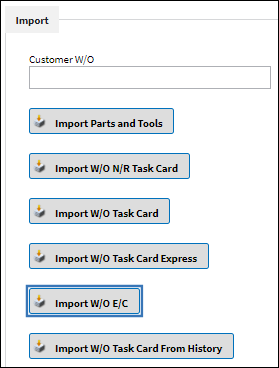
Complete all of the Import steps.
For information regarding how to Import a file, refer to Importing a File via Import Button of the System Standards Training Manual.
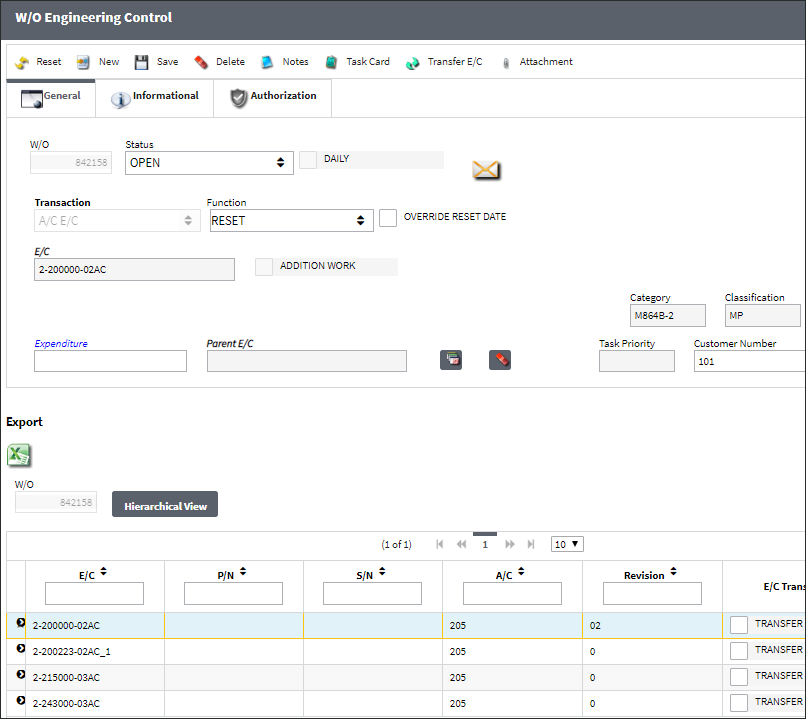
 Note: Users may associate a Customer Number (chronological number) with an E/C attached to the W/O via this import. This Customer Number will appear in the W/O Engineering window (below).
After importing an excel file with no exceptions, the user may go to the W/O Engineering Control window to view the E/C information that was imported.
Share
Print
|
©1997-2026 Trax USA Corp. All rights reserved. This manual may not be copied, photocopied, reproduced, translated, or converted to any electronic or machine-readable form, in whole or in part, without prior written approval from Trax USA Corp. |
 |