
 Share
 Print
|
|
|
|
|


Configurations Button, via W/O Planning Tab
From the W/O Planning Tab select the Configurations  button to bring up the Configurations pop up window. From here, the interactive calender display can be customized to better fit a particular planning agenda. From the Configurations window users can categorize E/C Types as pertaining to an A-Check or C-Check, specify the duration of Checks, and the buffer time between Checks.
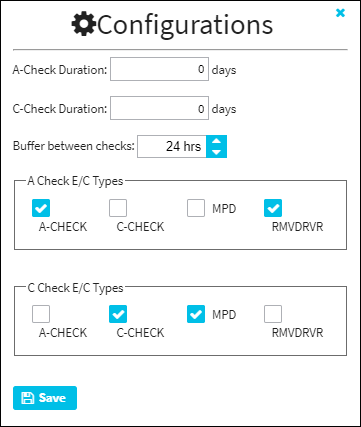
The following information/options are available in this window:
_____________________________________________________________________________________
A-Check Duration
Enter the duration of the A-Check in days.
C-Check Duration
Enter the duration of the C-Check in days.
Buffer Between Checks
Enter the duration of time between Checks in hours.
A-Checks E/C Types section
The A-Check E/C Types section will display all the E/C TYPE System Trans Codes. From this section users can select which E/C Types are A-Check.
C-Check E/C Types section
The C-Check E/C Types section will display all the E/C TYPE System Trans Codes. From this section users can select which E/C Types are C-Check.
Save button
Select to save configuration changes.
_____________________________________________________________________________________
Share
Print
|
©1997-2026 Trax USA Corp. All rights reserved. This manual may not be copied, photocopied, reproduced, translated, or converted to any electronic or machine-readable form, in whole or in part, without prior written approval from Trax USA Corp. |
 |