
 Share
 Print
|
|
|
|
|


The Deicing tab displays the deicing fluid information. Additionally, its allows users to manage/update De-Icing entries for a flight's logbook.
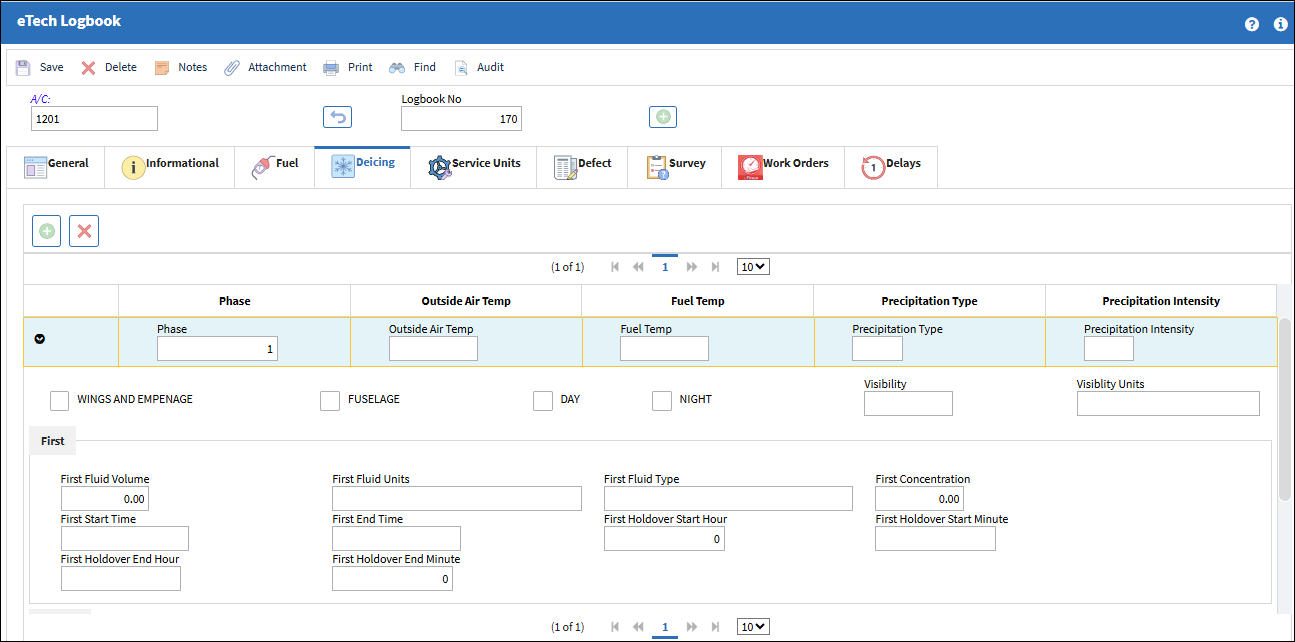
The following information/options are available in this window:
_____________________________________________________________________________________
New  button

Select the New button to add a De-Icing entry to the flight’s logbook. Up to 3 De-Icing entries can be added to a logbook. This function allows De-Icing information to be added to a flight logbook as part of a backup process for the De-Icing window in the PilotLog app.
Delete  button
Select the Delete button to remove a De-Icing entry from the flight's logbook.
A/C
The individual aircraft tail number.
Logbook No.
The eTech Logbook number associated with the SN. This field is populated when saved. Displays the current logbook number. The left  button and right
 buttons can be used to display the previous or next logbook entry.
Deice Temperature
The outside temperature at the time of deicing.
UOM Temperature
The unit type used to measure the temperature.
Deice Fluid
The type of deicing fluid (Type I, Type II, etc.) with an option for a secondary deicing fluid.
Deice Fluid 2 
The type of deicing fluid (Type I, Type II, etc.) with an option for a secondary deicing fluid.
Deicing Information
Deice Concentration - The deicing fluid concentration. If more than one fluid type is populated, a secondary fluid concentration is available.
Deice Concentration 2 - The deicing fluid concentration. If more than one fluid type is populated, a secondary fluid concentration is available.
Deice Start Time Hour/Minute - The date and time deicing began.
Deice End Time Hour/Minute - The date and time deicing was completed.
_____________________________________________________________________________________
Share
Print
|
©1997-2026 Trax USA Corp. All rights reserved. This manual may not be copied, photocopied, reproduced, translated, or converted to any electronic or machine-readable form, in whole or in part, without prior written approval from Trax USA Corp. |
 |