
 Share
 Print
|
|
|
|
|


A/C Type/Series, Fuel Tanks Tab

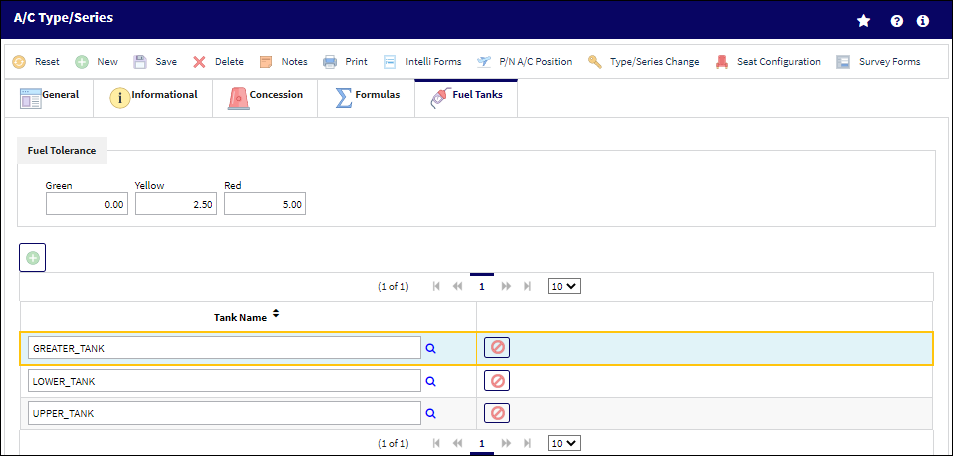
The A/C Type/Series, Fuel Tanks tab, allows users to configure fuel tank specifications for an A/C Type/Series (e.g., left tank, right tank, center tank, etc.). The Fuel Tolerance section is used to define the Fuel Tolerance indicators (e.g., Green, Yellow, and Red) for the Type/Series. The indicated fuel tolerance levels will inform the Fuel Tolerance banner in the PilotLog application.
Fuel Tank configurations may effect the following:
- The eTech Logbook Detail, Fuel Tab in the eTech Logbook app (also available in eMRO)
- The Fuel Window, via New Log in the PilotLog app
- The A/C Service Units button in the QuickTurn app
To add a Fuel Tank, select the New  button, then select the Save
 button.
Note: Fuel Tank configurations can be made for an individual A/C tail number from the A/C Master, Fuel Tanks Tab.
Share
Print
|
©1997-2026 Trax USA Corp. All rights reserved. This manual may not be copied, photocopied, reproduced, translated, or converted to any electronic or machine-readable form, in whole or in part, without prior written approval from Trax USA Corp. |
 |