
 Share
 Print
|
|
|
|
|


Select a location in the Location Master and then select the Centralized Routing button  . The system displays the following window. The Master Location is the central location, and the various other Locations that are linked to that centralized location are added in the Location field. Select the New
 button to add the locations that comprise this centralized location's distribution cluster.
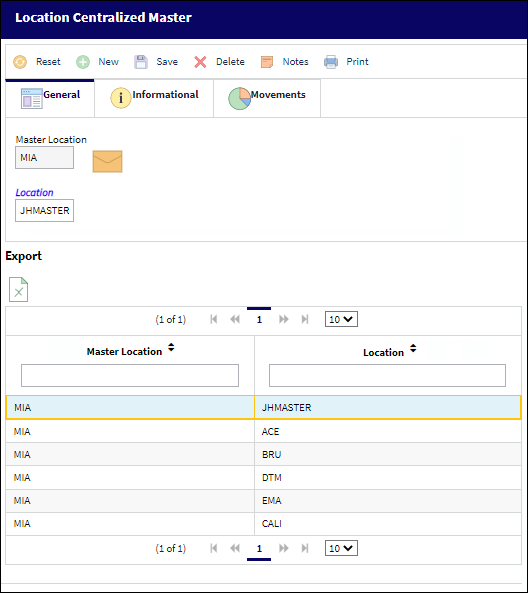
The following information/options are available in this window:
_____________________________________________________________________________________
Master Location
This is the centralized location for the Locations entered in the Location field below. There can be different Master Locations with their own set of sub Locations.
Location
This is one of the Locations that correspond to the Master Location above.
_____________________________________________________________________________________
Share
Print
|
©1997-2026 Trax USA Corp. All rights reserved. This manual may not be copied, photocopied, reproduced, translated, or converted to any electronic or machine-readable form, in whole or in part, without prior written approval from Trax USA Corp. |
 |