
 Share
 Print
|
|
|
|
|


System Data Import

The System Data Import window allows operators to import records outside of the specific Import buttons found in numerous system modules.
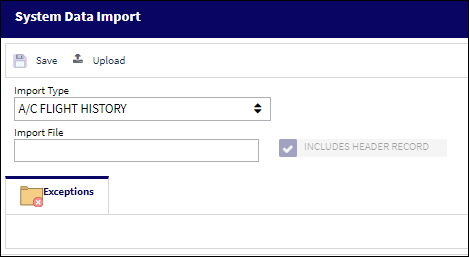
The following information/options are available in this window:
_____________________________________________________________________________________
Save button
Select this button to save the imported data.
Upload button
Select this button to upload a Excel file with the appropriate import data.
Includes Header Record checkbox
Select this checkbox to include the Header section of the Excel file as appropriate import data.
Import Type drop down
Use the drop down to select the type of import data that will be uploaded.
- A/C Flight History
- Employee Master
- Engineering Effectivity A/C
- Engineering Effectivity P/N S/N
- Engineering E/O Task Card
- Installed Parts
- Inventory Parts
- Location Bins
- Location Master
- P/N Controls
- P/N Master
- P/N NHA NLA
- P/N S/N Controls Inventory
- Vendor Master
For detailed information on the columns in each import file, contact the Trax Data Migration team by creating a Weblog.
_____________________________________________________________________________________
Share
Print
|
©1997-2026 Trax USA Corp. All rights reserved. This manual may not be copied, photocopied, reproduced, translated, or converted to any electronic or machine-readable form, in whole or in part, without prior written approval from Trax USA Corp. |
 |