
 Share
 Print
|
|
|
|
|


The Survey Questions  button allows the user to add survey questions to the associated Task Card.

 Note: This button is security controlled via Security Explorer/ Production/ Print/ W/O/ W/O Task Card Survey Questions. For additional information, refer to the Security Explorer, via the System Administration Manual.
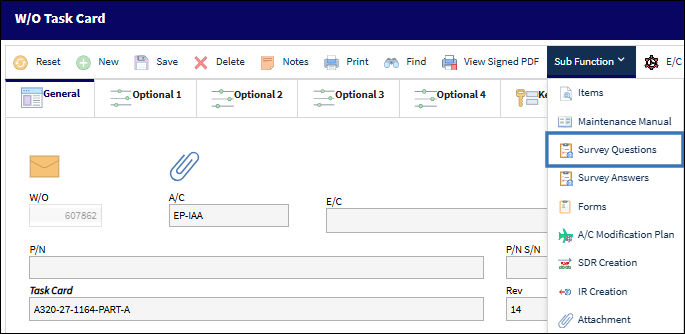
Select the desired Response Type for the question. The user can also select to make the response mandatory by selecting the Response Mandatory checkbox.
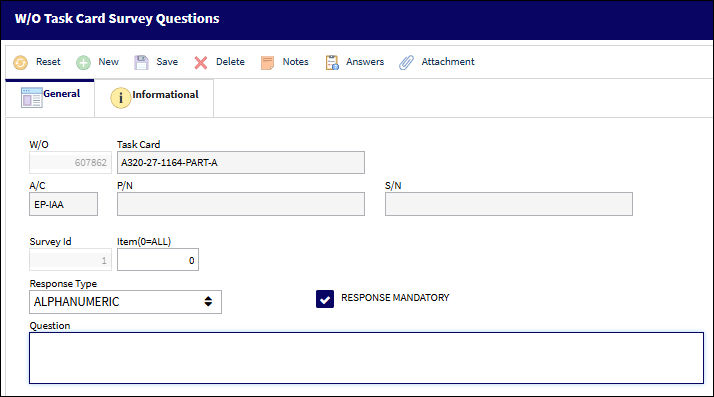
The following information/options are available in this window:
_____________________________________________________________________________________
When creating a question, the user select between varying response types.
- AlphaNumeric - The response can include both letters and numbers.
- Numeric - The response will include only numbers.
- AlphaNumeric Range - The response will consist of a range and both letters and numbers can be used.
- Numeric Range - The response will consist of a range and only numbers can be used.
- Yes/No - Based on the answer, supplemental functionality may be triggered affecting additional E/Cs.
- Multiple Choice - The response will be a selection made from one of the available options provided. For more information how to answer multiple choice questions, refer to Answer Multiple Choice Survey.
_____________________________________________________________________________________
Share
Print
|
©1997-2026 Trax USA Corp. All rights reserved. This manual may not be copied, photocopied, reproduced, translated, or converted to any electronic or machine-readable form, in whole or in part, without prior written approval from Trax USA Corp. |
 |