
 Share
 Print
|
|
|
|
|


eMRO Inventory Forecast

The Inventory Forecast window, enables users to generate targeted forecasts for components currently held in inventory at a designated location. This tool supports maintenance planning by providing visibility into Schedules, Actuals, Remaining Hours/Cycles, and Due Dates. It focuses on Part Number Engineering Controls (P/N E/Cs) and Part Number Controls, specifically for components that are off-wing and stored at a specific location.
Forecast results are sorted in ascending order by Due Date, Part Number, and Serial Number. This ensures that components with the earliest or overdue maintenance appear at the top of the results.
This functionality enables targeted forecasting using customizable filters, helps identify components that are due or will be past due for maintenance, and supports decision-making on whether to install or service a part.
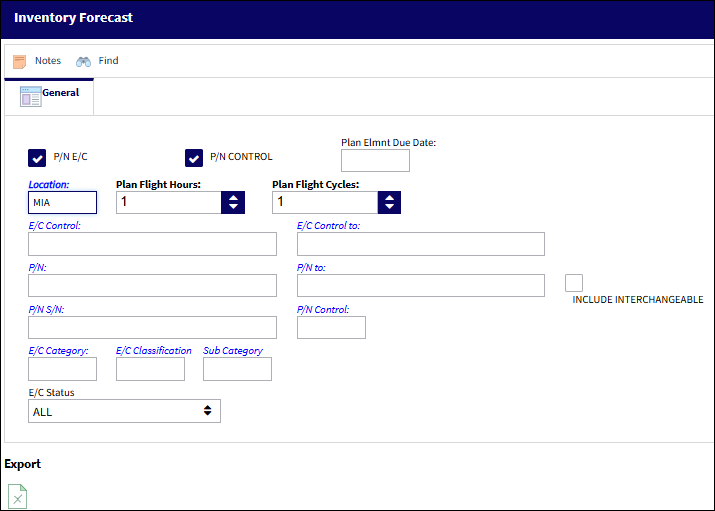
Query:
_____________________________________________________________________________________
P/N E/C Checkbox
When selected, filters results to show only Part Number Engineering Controls.
P/N Control
When selected, filters results to show only Part Number Controls (e.g., TSO, REP, HYDRO).
Plan Elmnt Due Date
The Inventory Forecast window will only return results for components that have Planning Element Items that are due before the populated date.
Location
The Location for maintenance events, inventory stores, orders, transactions, or training events.
Plan Flight Hours
Estimated average flight cycles used to calculate the part’s due date. Parts in inventory do not accumulate cycles, but this helps forecast pre-installation.
Note: The due date will exclusively be based on this estimate.
Plan Fight Cycles
Estimated average flight cycles used to calculate the part’s due date. Same logic as flight hours.
Note: The due date will exclusively be based on this estimate.
E/C Control (From-To)
Enter the From-To E/C range for the forecast request.
P/N (From-To)
The Part Number reference for the aircraft part. (Range)
Include Interchangeable checkbox
Select the Include Interchangeable P/N History checkbox to query for main and interchangeable P/Ns. If the Include Interchangeable P/N History checkbox is de-selected, then only the main P/N appears in the query results.
P/N S/N
The Serial Number for the specific serialized part.
P/N Control
The time control related to the part (e.g., TSN, TSO, etc.) used to define its limits.
E/C Category
The category of the E/C (e.g., AD, SB, CHECK).
E/C Classification
The classification of the E/C (i.e. Mandatory, Optional, etc.).
Sub Category
A Sub Category can be used to further define the E/C Category, if applicable. For example, users may want to classify their ADs for Engines, APUs, and Landing Gear separately. The Sub Category System Transaction Code is set up via Settings/ Explorer/ System Transaction Code/ Engineering.
E/C Status
Select the status of the E/C from one of the following options:
ALL - All records.
Applicable/ Not Embody - The E/C is applicable to an A/C Type/Series or Part Number, but may not be mandatory. This status allows the E/C to be entered in the system, but does not require compliance.
Cancel - The E/C has been cancelled.
N/A - The originating document (AD, SB, MOD, etc.) has been evaluated and is deemed not effective to a specific A/C or P/N.
Open - The E/C is Open.
Pending - This is the default status. This will be the status until the E/C is authorized. If the user requires holding this E/C until ready, it can be left as Pending even after the record has been saved. Once the E/C is authorized the status will show as Open.
Rejected - The E/C was rejected or not authorized and may need to be sent back through the authorization process for revision. This status should not be selected manually.
Terminated - The E/C is no longer in use. It has either been complied with for all effective aircraft or components, or the action of another E/C has terminated it. When an E/C is terminated, the termination applies to the entire fleet. This status should not be selected manually.
_____________________________________________________________________________________
Results:
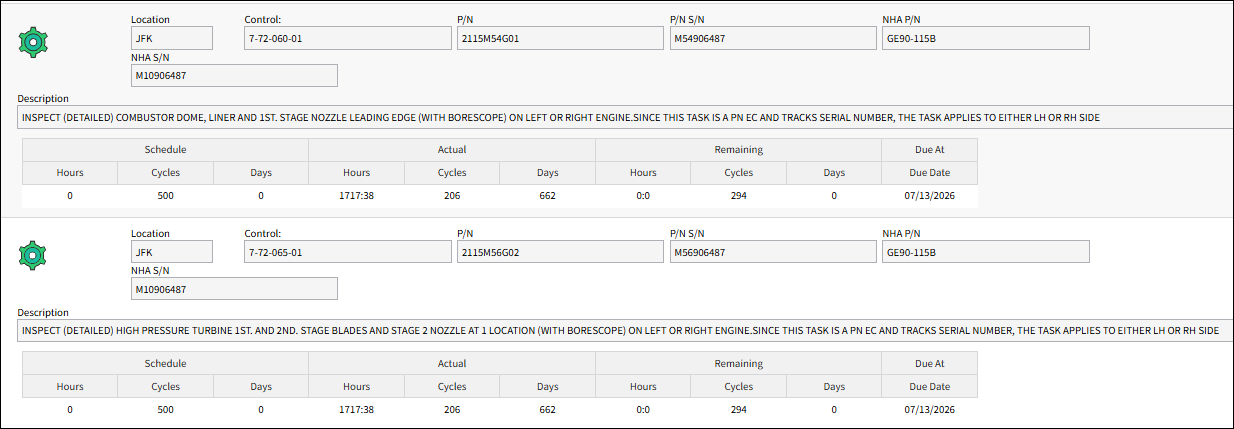
_____________________________________________________________________________________
Export as Excel button
The Export as Excel  button can be selected to view the queried data (including all pages) in an Excel spreadsheet. This Excel file can be saved for later use. For more information refer to the Export as Excel Button via the eMRO System Standards manual.
Location
The Location for maintenance events, inventory stores, orders, transactions, or training events.
Control
The time control related to the part (e.g., TSN, TSO, etc.) used to define its limits.
P/N
The Part Number reference for the aircraft part.
P/N S/N
The Serial Number for the specific serialized part.
NHA P/N
The part’s Next Higher Assembly P/N (if applicable).
NHA S/N
Next Higher Assembly (NHA) serial number.
Description
The description of the part.
Schedule
The Schedule Hours/Cycles/Days for the item.
Actual
The Actual time accumulated on the item (hours/cycles/days) from the effective date and/or the last compliance date.
Remaining
The time remaining on the item's schedule before it is due. The figures include flight hours/cycles and days. Maintenance events that are overdue are negative (example: '-2').
Due Date
The date that the maintenance item was due.
_____________________________________________________________________________________
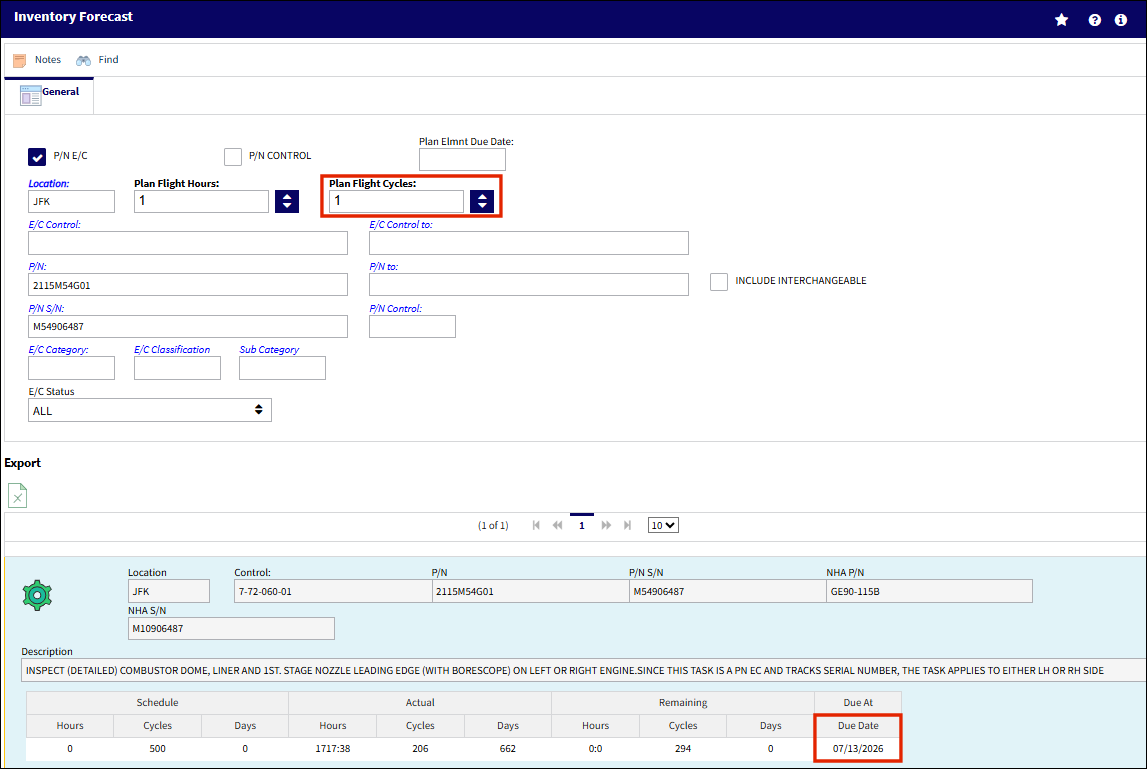
In the following example, a forecast was requested for a specific P/N, P/N Control and Location. In addition, the Plan Flight Cycles drop down is set to 1. The results section accurately displays the Schedule, Actuals, Remaining and Due Date information.
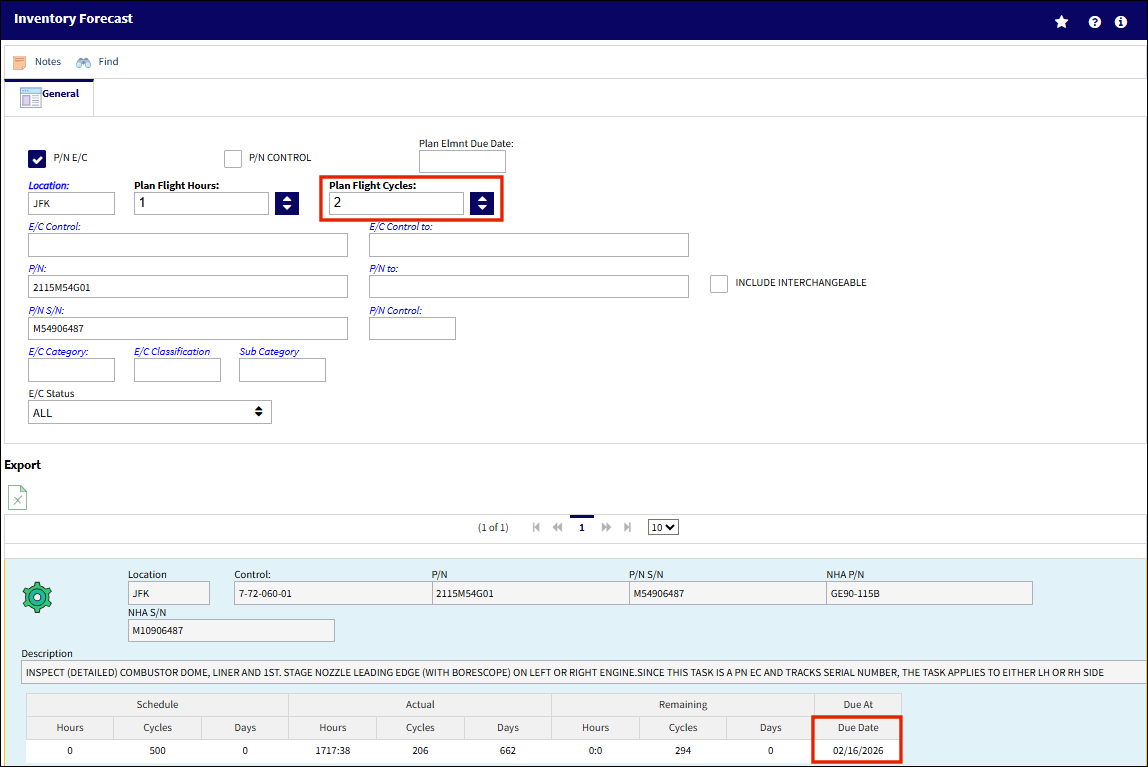
A forecast is created for the same P/N, P/N Control and Location. However, the Plan Flight Cycles drop down is now set to 2. This makes the average utilization for the P/N higher than our prior forecast. Therefore, the Due Date will be earlier than our prior forecast.
Share
Print
|
©1997-2026 Trax USA Corp. All rights reserved. This manual may not be copied, photocopied, reproduced, translated, or converted to any electronic or machine-readable form, in whole or in part, without prior written approval from Trax USA Corp. |
 |