
 Share
 Print
|
|
|
|
|


eMRO Shop W/O Mass Delinking

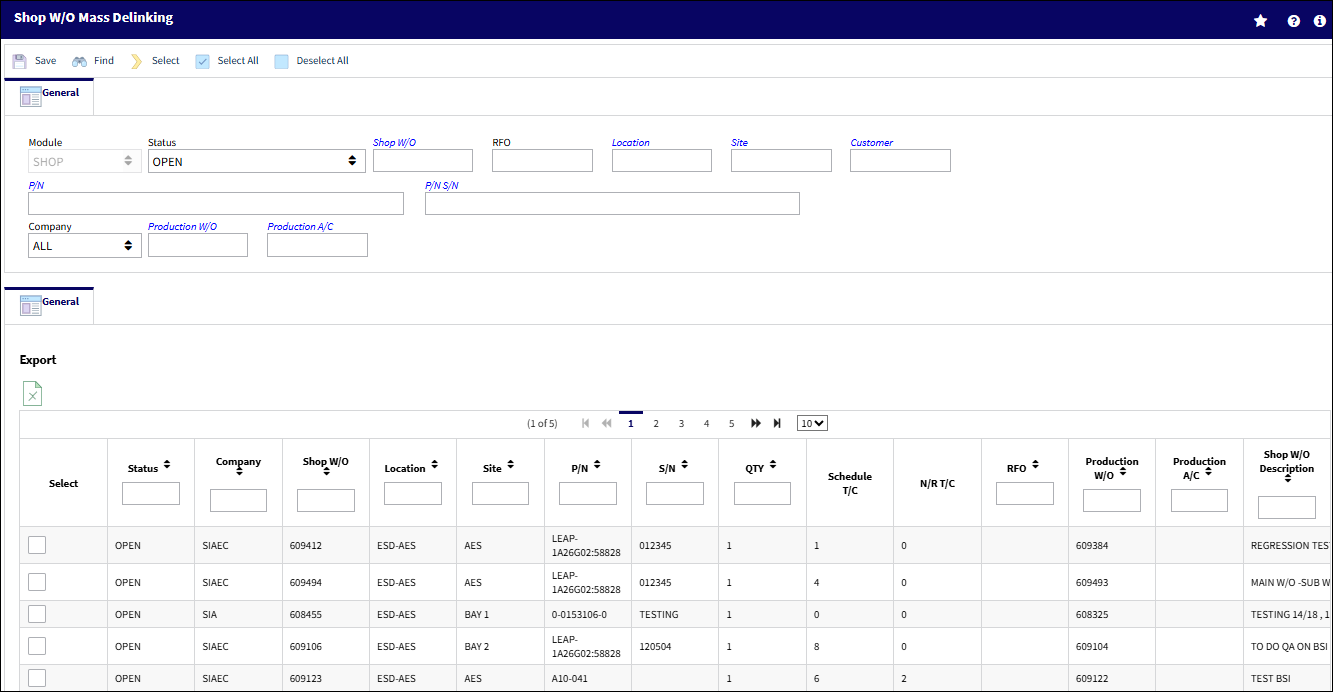
The Shop W/O Mass Delinking window is used to delink W/Os from their parent W/Os. Users can do this in mass by selecting multiple Shop W/Os at once.
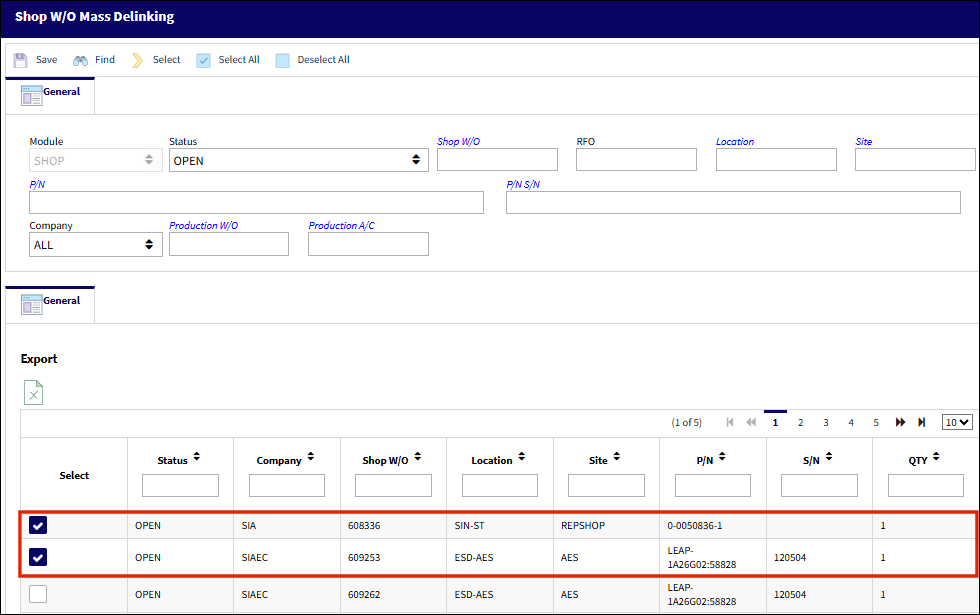
In th example below, multiple Shop W/Os have been selected to be delinked. When the desired orders are selected, the user can press the Save  button to delink the orders.
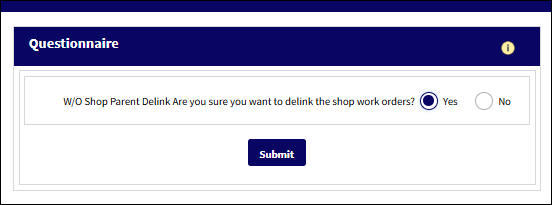
When the Save button is selected, a prompt appears asking the user to confirm the action of delinking the Shop W/Os,
Query:
The following information/options are available in this window:
_____________________________________________________________________________________
Status
The status of the Shop Work Order.
Open - If Shop W/O is Open, and a rotable is issued and later returned, the system will force the user to do a Work Order Credit, which may not be the correct transaction.
Completed - Shop W/O is completed but not closed, updates are allowed.
Line - Shop W/O is for Line Maintenance Issues only (items returned will not require Credit Work Order). Because it is necessary for material to be issued to a Shop W/O on the system, some companies prefer to use specific W/O's for this purpose. A Shop W/O could be created for every aircraft turn around but this may cause an unacceptable administrative burden. For the purposes of creating Shop W/O's with material requirements, it is possible to select the Line status rather than Open status (when creating the new Work Order). The Line status will allow rotable parts to be issued to the Shop W/O and later returned U/S (if removed at a later time). For additional information, please refer to the Shop W/O closing section regarding closing Line Work Orders.
Generation - Shop W/O is in the process of being created.
Shop W/O
The Shop Work Order reference number.
RFO
This field is part of the SAP interface. An alphanumeric code is autopopulated from SAP.
Note: This field is part of a customer specific process and may not be available for all operators.
Location
The Location for maintenance events, inventory stores, orders, transactions, or training events.
Site
The Site where the work is to be carried out (if applicable).
Customer
The customer for whom the Work Order was created.
P/N
The Part Number reference for the aircraft part.
P/N S/N
The Serial Number for the specific serialized part.
Company
The company the Work Order was created for.
Production W/O
The Production W/O number is the W/O number that is related to the A/C check.
Production A/C
The aircraft associated with the Production W/O.
_____________________________________________________________________________________
Results:
The following information/options are available in this window:
_____________________________________________________________________________________
Status
The status of the Shop Work Order.
Open - If Shop W/O is Open, and a rotable is issued and later returned, the system will force the user to do a Work Order Credit, which may not be the correct transaction.
Completed - The date the shop work order was closed on.
Line - Shop W/O is for Line Maintenance Issues only (items returned will not require Credit Work Order). Because it is necessary for material to be issued to a Shop W/O on the system, some companies prefer to use specific W/O's for this purpose. A Shop W/O could be created for every aircraft turn around but this may cause an unacceptable administrative burden. For the purposes of creating Shop W/O's with material requirements, it is possible to select the Line status rather than Open status (when creating the new Work Order). The Line status will allow rotable parts to be issued to the Shop W/O and later returned U/S (if removed at a later time). For additional information, please refer to the Shop W/O closing section regarding closing Line Work Orders.
Generation - Shop W/O is in the process of being created.
Shop W/O
The Shop Work Order reference number.
RFO
This field is part of the SAP interface. An alphanumeric code is autopopulated from SAP.
Note: This field is part of a customer specific process and may not be available for all operators.
Location
The Location for maintenance events, inventory stores, orders, transactions, or training events.
Site
The Site where the work is to be carried out (if applicable).
Customer
The customer for whom the Work Order was created.
P/N
The Part Number reference for the aircraft part.
P/N S/N
The Serial Number for the specific serialized part.
Company
The company the Work Order was created for.
Production W/O
The Production W/O number is the W/O number that is related to the A/C check.
Production A/C
The aircraft associated with the Production W/O.
Shop W/O Description
The description of the shop W/O.
_____________________________________________________________________________________
Share
Print
|
©1997-2026 Trax USA Corp. All rights reserved. This manual may not be copied, photocopied, reproduced, translated, or converted to any electronic or machine-readable form, in whole or in part, without prior written approval from Trax USA Corp. |
 |