
 Share
Share
 Print
Print
|
|
|
|
|


The Airbus Import files, particularly the Constituent Assy, Equipment, and Conformity to Design Standard, fields and its contents must meet the specifications defined in the tables below in order to load correctly into TRAX. After the Excel file is modified to the specifications, it must be converted to tab delimited text file for loading into TRAX. Keep a copy of the Excel file as the master source because once the excel file is saved as a tab delimited text file, it cannot be opened again in Microsoft Excel for editing.
Prepare the file(s) (.xls) provided by the aircraft manufacturer in Microsoft Excel as follows:
Open the Excel file in Microsoft Excel.
Arrange and modify the columns (fields) to meet the specification in the table below with each file type (Constituent Assy, Equipment, and Conformity to Design Standard), as needed, in separate sheets.
Some cells may have multiple entries and the data must be space delimited or line delimited inside that cell.
Constituent Assy
|
Column Name |
Data |
TRAX Fields Populated |
Path |
A |
Type |
N/A |
not imported |
|
B |
MSN |
N/A |
not imported |
|
C |
Owner |
N/A |
not imported |
|
D |
Part Number |
35 characters |
P/N, via Inventory Detail AND P/N, via Inventory Control AND P/N, via Engineering Effectivity |
Inventory/ Update/ Inventory Transaction/ Inventory Detail AND Inventory/ Update/ Inventory Transaction/ Inventory Detail/ Control button AND Inventory/ Update/ Inventory Transaction/ Effectivity button |
E |
Description |
N/A |
not imported |
|
F |
Serial Number |
20 characters |
P/N S/N, via Inventory Detail AND P/N S/N, via Inventory Control AND P/N S/N, via Engineering Effectivity |
Inventory/ Update/ Inventory Transaction/ Inventory Detail AND Inventory/ Update/ Inventory Transaction/ Inventory Detail/ Control button AND Inventory/ Update/ Inventory Transaction/ Effectivity button |
Equipment
|
Column Name |
Data |
TRAX Fields Populated |
Path |
A |
Type |
N/A |
not imported |
|
B |
MSN |
N/A |
not imported |
|
C |
Owner |
N/A |
not imported |
|
D |
ATA |
N/A |
not imported |
|
E |
Zone |
N/A |
not imported |
|
F |
FIN |
N/A |
not imported |
|
G |
Description |
N/A |
not imported |
|
H |
Vendor |
N/A |
not imported |
|
I |
Code |
N/A |
not imported |
|
J |
BFE |
N/A |
not imported |
|
K |
Part Number |
35 characters |
P/N, via Inventory Detail AND P/N, via Inventory Control AND P/N, via Engineering Effectivity |
Inventory/ Update/ Inventory Transaction/ Inventory Detail AND Inventory/ Update/ Inventory Transaction/ Inventory Detail/ Control button AND Inventory/ Update/ Inventory Transaction/ Effectivity button |
L |
Serial Number |
20 characters |
P/N S/N, via Inventory Detail AND P/N S/N, via Inventory Control AND P/N S/N, via Engineering Effectivity |
Inventory/ Update/ Inventory Transaction/ Inventory Detail AND Inventory/ Update/ Inventory Transaction/ Inventory Detail/ Control button AND Inventory/ Update/ Inventory Transaction/ Effectivity button |
M |
Generic Part Number |
N/A |
not imported |
|
N |
Hardware FIN |
20 characters |
Installed Position |
Inventory/ Update/ Inventory Transaction/ Inventory Detail |
O |
Date of Manufacturing |
DATE |
Installed Date |
Inventory/ Update/ Inventory Transaction/ Inventory Detail |
P |
Date of Weight |
N/A |
not imported |
|
Q |
Hydrostatic Date |
N/A |
not imported |
|
R |
Acceptance Date |
N/A |
not imported |
|
S |
Battery Exp. Date |
N/A |
not imported |
|
T |
Test Date |
N/A |
not imported |
|
U |
Overhaul Date |
N/A |
not imported |
|
V |
Remark |
N/A |
not imported |
|
Conformity to Design Standard
|
Column Name |
Data |
TRAX Fields Populated |
Path |
A |
Type |
N/A |
not imported |
|
B |
MSN |
N/A |
not imported |
|
C |
Owner |
N/A |
not imported |
|
D |
MOD |
35 characters |
Engineering Document |
Engineering/ Update/ Engineering Control |
E |
Title |
N/A |
not imported |
|
F |
Status |
N/A |
not imported |
|
Save the files in Excel (.xls) format to keep as a master source.
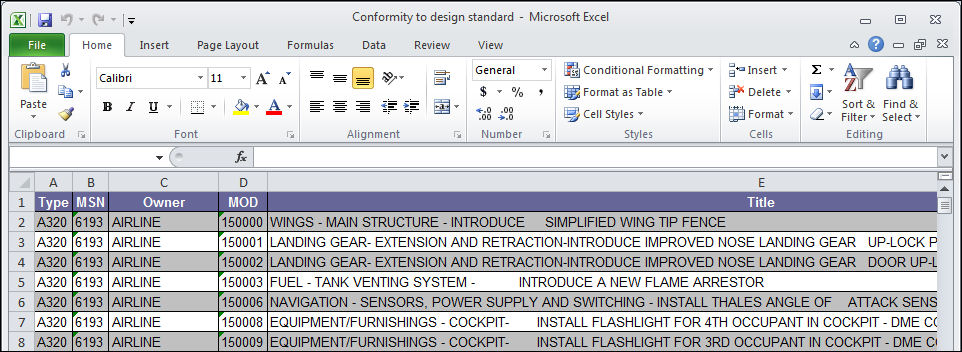
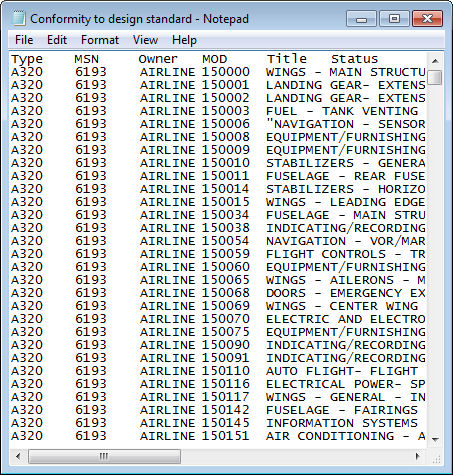
Save another copy of the file as a tab delimited text file for loading into TRAX.
Share
Print
|
©1997-2026 Trax USA Corp. All rights reserved. This manual may not be copied, photocopied, reproduced, translated, or converted to any electronic or machine-readable form, in whole or in part, without prior written approval from Trax USA Corp. |
 |