
 Share
Share
 Print
Print
|
|
|
|
|


Manufacturer Reliability Export
The Manufacturer Reliability Export program is a tool used to export information to Microsoft Excel. There are several different export options that will provide different information:
- Aircraft Utilization
- Aircraft Utilization With Service Days
- Component Removals
- Costs
- Cross Reference
- Flight Interruptions
- Performed Tasks
- Pireps / Mareps
- Service Bulletins / Airworthiness Directives
The different option will be explained in detail below. For all options, the process is as follows:
1. Select the option you want to run from the drop-down menu.
2. Enter a month/year that you want to run the report for.
3. Select a folder on the computer that you want the file to be saved to. A right mouse-click in the Out Folder field opens a browse window that allows to select the file destination.
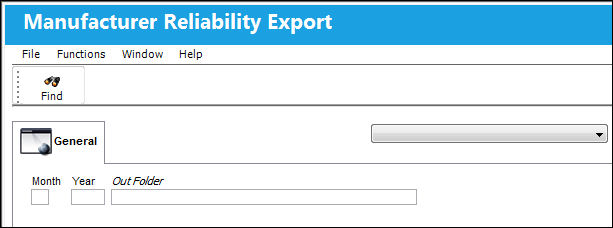
4. Select  to run the report.
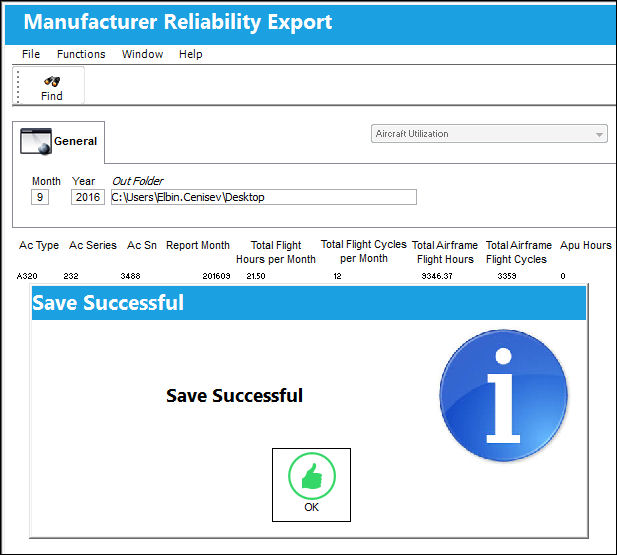
5. The program will display a message once the report is saved successfully and will show the data that is saved in the file:
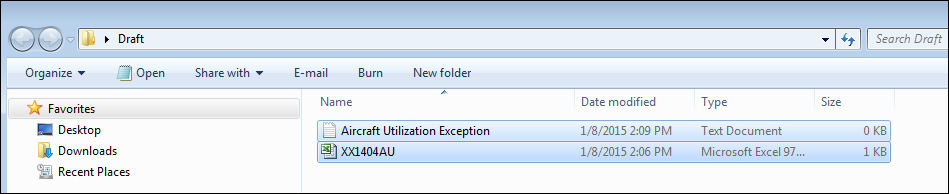
6. Two files are created in the selected folder: an Excel file and a .txt file. The Excel file will contain the data, and the .txt file any exceptions that occurred during the save.
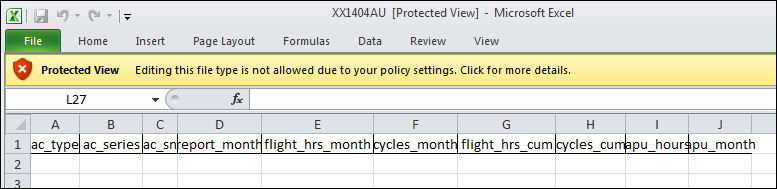
7. The Excel file will look similar to the below picture:
Share
Print
|
©1997-2026 Trax USA Corp. All rights reserved. This manual may not be copied, photocopied, reproduced, translated, or converted to any electronic or machine-readable form, in whole or in part, without prior written approval from Trax USA Corp. |
 |