
 Share
Share
 Print
Print
|
|
|
|
|


Spec2000 Reliability Exports
The Spec2000 Reliability Exports allows for the creation of Reliability Reports that comply with the ATA Spec2000 standards. The reports are created as XML files that conform to the specifications of Chapter 11 of the Spec2000.
Export a Spec2000 XML Reliability Report as follows:
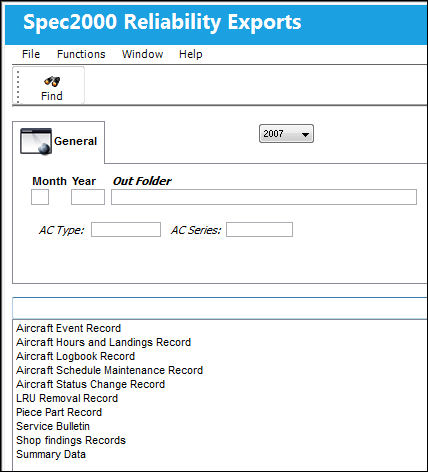
The following information/options are available in this window:
_____________________________________________________________________________________
Version drop down
The Spec2000 version.
List of Exports
Select a SPEC2000 Report.
Aircraft Event Record - This record is for collecting aircraft technical incidents as well as delay, cancelation, air or ground turnbacks and aircraft diversions data. It is to be completed by an aircraft operator or third party maintenance provider. Key fields will link the Aircraft Event Record to the Aircraft Logbook Record and LRU Removal Record.
TRAX term = Defect Report.
When the Aircraft Event Record report is selected, the A/C Type/Series fields, along with the Chargeable drop down, are available.
Aircraft Hours and Landings Record - This record is for detailing the total and monthly flight hours and cycles of an operator’s fleet. It is for the purpose of calculating fleet utilization, hour/cycle ratios and reliability measures such as Mean Time Between Unscheduled Removals (MTBUR), Mean Time Between Failure (MTBF), etc. This record is also used to report aircraft short-term out-of-service. It is to be completed by an aircraft operator. For more information, refer to the Aircraft Hours and Landings Record Spec2000 Report.
TRAX term = A/C Actual Flights.
When the Aircraft Hours and Landings Record report is selected, the A/C Type/Series fields are available.
Aircraft Logbook Record - This record is for collecting aircraft Technical Logbook, Maintenance Logbook and Cabin Logbook data. It is to be completed by the aircraft operator or third party maintenance provider. Key fields will link the Logbook Record to the Aircraft Event Record, LRU Removal Record and the Scheduled Maintenance Record.
TRAX term = Defect Reports.
When the Aircraft Logbook Record report is selected, the A/C Type/Series fields are available.
Aircraft Schedule Maintenance Record - This record is for collecting aircraft scheduled maintenance visit data. It is to be completed by an aircraft operator or a third party maintenance provider. Key fields will link the Aircraft Scheduled Maintenance Record to the Logbook Record, the LRU Removal Record and the Service Bulletin/Modification Record.
TRAX term = Work Order, Compliance, Non-Routines.
When the Aircraft Schedule Maintenance Record report is selected, the A/C Type/Series fields are available.
Aircraft Status Change Record - This record is for collecting and exchanging aircraft changes in ownership, registration number, engine type and aircraft operator. This record is also used to report long-term aircraft out-of-service. It is to be completed by both the aircraft receiving organization and the aircraft releasing organization. Engine type changes are to be reported by the aircraft operator.
TRAX term = Registration Change.
When the Aircraft Status Change Record report is selected, the A/C Type/Series and From/To A/C fields are available.
LRU Removal Record - This record is for collecting LRU removal data identified by part number, serial number, Commercial And Government Entity (CAGE) code as well as the aircraft from which it was removed and the details surrounding why the LRU needed to be removed. It is to be completed by an aircraft operator, third party repair facility or whoever is removing the component. Key fields will link the LRU Removal Record to the Shop Finding Record and the Aircraft Event Record.
TRAX term = A/C P/N Transaction.
When the LRU Removal Record report is selected, the A/C Type/Series fields are available.
Piece Part Record - This record is for collecting and exchanging information about Shop Replaceable Units (SRU’s) and other piece parts associated with a shop received LRU. Key fields will link the Piece Part Record to the Shop Finding Record.
Service Bulletin - This record is for collecting information on the incorporation of service bulletins, other modifications such as Supplemental Type Certificates and Airworthiness Directives when included with a Service Bulletin. Airworthiness Directives not accompanied by a Service Bulletin will only be collected in the Logbook record. This record is to be completed by the aircraft operator or the third party maintenance provider that incorporated the bulletins. Key fields will link the Service Bulletin/Modification Record to the Aircraft Scheduled Maintenance Record and the Logbook Record.
TRAX term = Engineering Control and Engineering Compliance.
When the Service Bulletin report is selected, the A/C Type/Series fields.
Shop Findings Record - This record is for collecting and exchanging LRU shop repair/teardown findings. It is to be completed by an aircraft operator’s repair shop, third party repair facility or original equipment manufacturer for the purpose of detailing the findings associated with an LRU that enters a shop. The Shop Findings Record is also used to collect Shop Replaceable Units (SRU’s) and other piece parts associated with the shop received LRU. Key fields will link the LRU Removal Record to the Shop Finding Record.
TRAX term = Tear down Reports.
Summary Data - This record is for collecting summarized rate and count information on an operator’s fleet. It is to be completed by the aircraft operator or third party maintenance provider.
TRAX terms = TRAX Record Incidents, Delays, and Cancelations of Defect Reports.
When the Summary Data report is selected, the A/C Type/Series fields and Aircraft Fleet checkbox are available.
AC Type
This field is used to filter data by A/C Type.
This field is mandatory in the Summary Data report.
AC Series
This field is used to filter data by A/C Series.
This field is mandatory in the Summary Data report.
Chargeable
This field is used to filter data for aircraft for which their work can be charged.
From AC-To AC
The range of aircraft (From-To) of the report .
These field is mandatory in the Aircraft Status Change Record report.
Aircraft Fleet checkbox
Select this checkbox to include the entire fleet in the report.
This field is mandatory in the Summary Data report.
Month
Enter a month for the report.
Year
Enter a year for the report.
Out Folder
Select a folder location to save the Reliability Export XML File.
_____________________________________________________________________________________
Select the Find  button to generate the record and save.
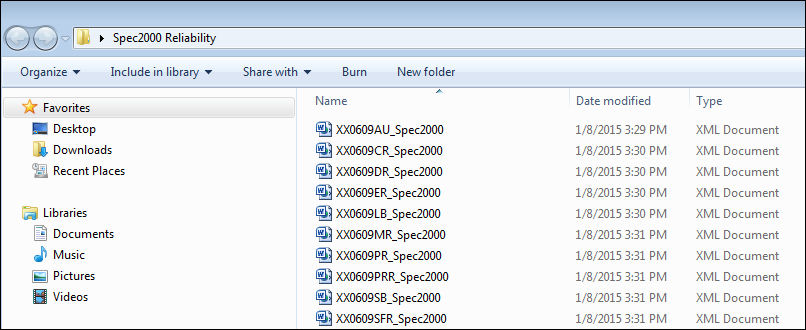
A Spec2000 file is saved to the specified folder. The XML Files are saved as XX0609PR_SPEC2000.xml in this example:
'06' |
This is the year of the report. |
'09' |
This is the month of the report. |
'PR' |
This is the report type. |
The reports are identified in the file name as follows:
Abbreviation |
Description |
AU |
Aircraft Hours and Landings Record |
LB |
Aircraft Logbook Record |
MR |
Aircraft Schedule Maintenance Record |
CR |
Aircraft Status Change Record |
ER |
Aircraft Event Record |
PR |
LRU Removal Record |
PPR |
Piece Part Record |
SB |
Service Bulletin |
SFR |
Shop Findings Record |
DR |
Summary Data |
For additional information, refer to the Spec2000 Calculated Formulas.
Share
Print
|
©1997-2026 Trax USA Corp. All rights reserved. This manual may not be copied, photocopied, reproduced, translated, or converted to any electronic or machine-readable form, in whole or in part, without prior written approval from Trax USA Corp. |
 |